
 Tracy Jackson15 yrs in online marketing
Asana Pricing in 2026: How to choose? Including AI Studio Costs
Table of Contents
If you’ve been searching for Asana pricing and landing on articles that reference “Premium” and “Business” plans — those names are gone.
Asana rebranded its plan lineup, and a significant amount of content across the web still uses the old names.
That’s creating real confusion for buyers trying to compare plans. This article uses the current names, current prices, and gives you a straight verdict on whether Asana pricing is worth it at each tier.
I cover Asana alongside six other tools in my full marketing project management software comparison if you’re still building a shortlist.
But if Asana is already on your list and you need to figure out which plan to buy — or whether the free plan is enough — this is the breakdown.
Asana Pricing at a Glance
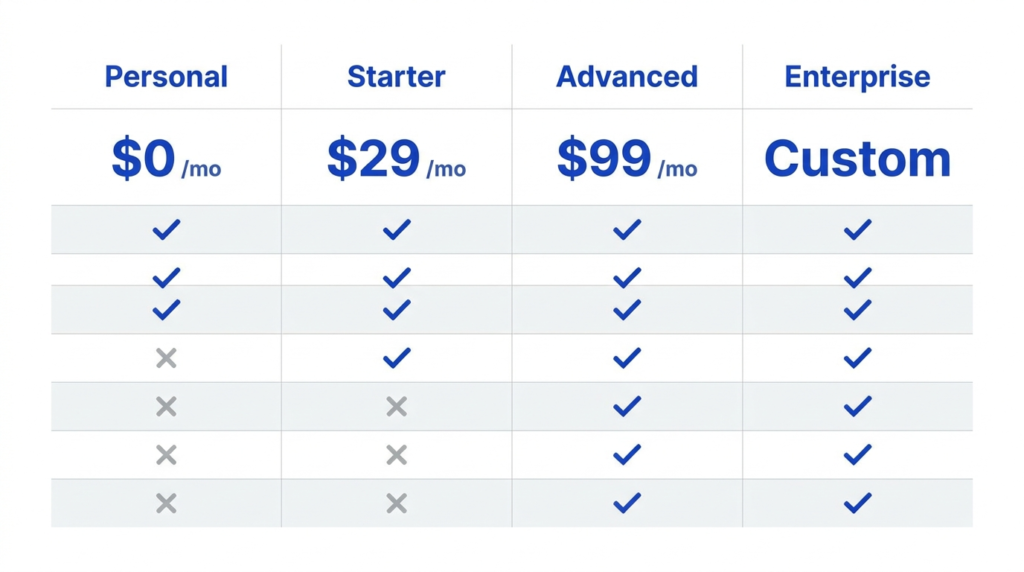
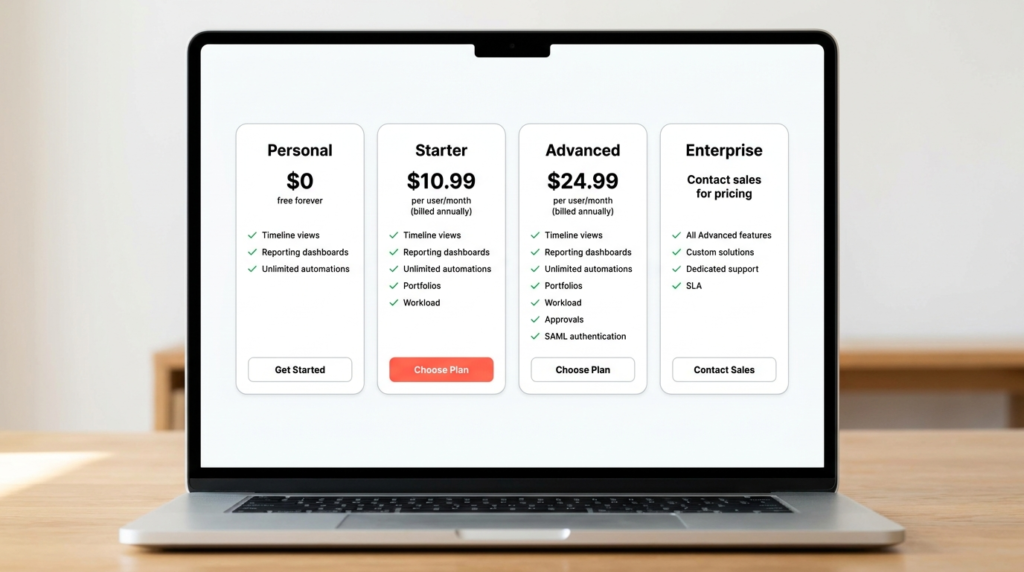
Asana costs $0 on the Personal plan, $10.99/user/month (annual) on Starter, and $24.99/user/month (annual) on Advanced. Enterprise pricing is custom. Annual billing saves up to 18% compared to paying month-to-month across both paid tiers.
Note on plan names: Asana’s Starter plan was previously called Premium. The Advanced plan was previously called Business. If you’ve seen references to “Asana Premium pricing” or “Asana Business pricing” elsewhere, those are the same plans under old names — Starter and Advanced are the current equivalents.
| Plan | Annual (per user/mo) | Monthly (per user/mo) | Free Plan | Member Limit | Best For |
|---|---|---|---|---|---|
| Personal | $0 | $0 | Yes | 2 users | Individuals and solo projects |
| Starter | $10.99 | $13.49 | — | No limit | Growing teams tracking projects and deadlines |
| Advanced | $24.99 | $30.49 | — | No limit | Teams managing portfolios and complex workflows |
| Enterprise | Custom | Custom | — | No limit | Orgs with compliance, security, and procurement requirements |
All prices verified from asana.com/pricing — May 2026. Prices may change; check asana.com/pricing for current rates.
Disclaimer: If you buy something using the links in this article, I may receive a commission at no extra cost to you.
Know that I only promote stuff that I use and trust for the sake of my readers and the reputation of this site.
Asana Pricing Plans: Full Breakdown
Asana Personal: What You Get and Who It’s For
Asana’s free plan is called Personal — and the name is intentional. It’s designed for individuals managing their own tasks and to-dos, not for teams.
Price: $0, free forever, no credit card required.
What’s included: unlimited tasks and projects, list, board, and calendar views, status updates, time tracking via integrations, 100+ free integrations, and 100MB maximum file size per attachment.
The hard limit that matters most: Personal is capped at 2 users. That’s not a soft limit — it’s a ceiling. If your team is three people, you’re already past it. This isn’t the “generous free plan with light restrictions” model that ClickUp or Notion use.
Asana’s Personal plan is genuinely for one person, maybe two, managing personal projects.
What you don’t get on Personal: timeline and Gantt views, reporting dashboards, workflow rules and automations, custom fields, custom templates, or forms. Those features are exclusively on paid plans.
Verdict: Personal is a legitimate tool for a solo marketer or freelancer who wants clean task management without paying anything.
For anyone managing work with a team of three or more, it’s a non-starter — not because the features are weak, but because the 2-user cap makes it structurally unavailable.
If you’re evaluating Asana for a team, start your thinking at Starter.
Asana Starter: What You Get and Who It’s For
Starter is where the Asana that most teams actually use begins. It’s the plan previously known as Premium, and for most growing marketing teams, it’s the plan that makes the most sense.
Price: $10.99/user/mo billed annually; $13.49/user/mo billed monthly. No seat limit.
The key unlocks over Personal:
- Timeline and Gantt views — essential for multi-phase campaign planning and deadline management across a team. This alone is a meaningful reason to upgrade.
- Reporting dashboards — track project status, task completion, and workload across the team without manual status updates.
- Unlimited automations — set rules to route tasks, update fields, trigger notifications, and eliminate repetitive admin.
- Forms — intake request forms that route directly into Asana projects. Critical for agencies or teams managing incoming work requests.
- Custom templates — build repeatable project structures for campaign launches, content production, or client onboarding.
- Custom fields — track campaign status, content type, priority, or any other variable your workflow needs.
- Unlimited free guests — bring in clients or external collaborators without adding to your seat count.
- AI Studio Basic included — 50,000 AI Studio Basic credits per billing account per month (help.asana.com).
What Starter doesn’t include: unlimited portfolios, goals tracking, workload management, approvals and proofing, Salesforce/Tableau/Power BI integration, or time tracking (that’s an add-on — more on that below).
Verdict: Starter is the right plan for most marketing teams of 3–20 people. The timeline view, automations, and reporting dashboards justify the per-seat cost for anyone doing real project coordination — not just task tracking.
At $10.99/seat/mo annual, it’s not cheap, but it’s meaningfully less than Asana’s old Premium pricing, and the no-seat-limit policy is genuinely useful for teams that add contractors seasonally.
Asana Advanced: What You Get and Who It’s For
Advanced is the plan previously known as Business. It’s the tier for teams that have outgrown Starter’s reporting capabilities or are managing work across multiple departments, campaigns, or client accounts simultaneously.
Price: $24.99/user/mo billed annually; $30.49/user/mo billed monthly. No seat limit.
What Advanced adds over Starter:
- Unlimited portfolios — manage and track multiple projects in a single view. Essential for anyone overseeing multiple campaigns or client accounts at once.
- Goals — connect team work to strategic objectives. Useful for marketing directors who need to show how campaign work maps to business targets.
- Workload — see capacity across the team. Who’s over-assigned? Who has room? This view is the difference between managing by gut feel and managing by data.
- Approvals and proofing — structured review and sign-off workflows built into Asana. Cuts down on the email chain that usually replaces a proper approval process.
- Salesforce, Tableau, and Power BI integration — for teams whose marketing reporting lives in those platforms.
- Time tracking — native time tracking without a separate integration.
- Formulas — calculated fields for tracking budgets, scores, or any numeric relationship between fields.
- Scaled security — additional controls for larger teams.
- AI Studio Basic included — 75,000 AI Studio Basic credits per billing account per month (help.asana.com).
Verdict: Advanced is genuinely powerful, but it’s not for everyone. The per-seat cost at $24.99/mo annual is more than double Starter — that compounds fast for larger teams. The features that justify the jump are portfolio management, workload visibility, and approvals.
If your team doesn’t run multiple concurrent campaigns, doesn’t need executive-level portfolio reporting, and isn’t managing a formal creative review process, Starter likely covers your needs.
Advanced makes sense for marketing leads managing a team of 10+ across multiple simultaneous campaigns, or agencies that need workload data to staff projects accurately.
Asana Enterprise: What You Get and Who It’s For
Enterprise pricing is custom — there’s no published per-seat number. Contact Asana sales to get a quote.
Price: Custom — contact Asana sales. Enterprise+ is available for organizations requiring increased security and compliance beyond standard Enterprise.
What Enterprise adds over Advanced:
- SAML authentication — required for most enterprise IT environments doing centralized identity management.
- User provisioning (SCIM) — automated user lifecycle management for large organizations.
- Universal workload — capacity management across the entire organization, not just a single team.
- Capacity planning — forecast team capacity against upcoming demand.
- Service accounts — for API-driven integrations at enterprise scale.
- View-only licenses — bring in stakeholders who need visibility without a full seat cost.
- Guest invite permissions — admin control over who can bring external users into the workspace.
- Workflow bundles — standardized templates deployed across the organization.
- AI Studio Basic included — 200,000 AI Studio Basic credits per billing account per month (help.asana.com).
Verdict: Enterprise is a procurement and governance play, not a features play. The features that distinguish it from Advanced — SAML, SCIM, capacity planning, compliance controls — matter to IT departments and security teams, not project managers.
If your organization’s IT or legal team is involved in the software buying decision, Enterprise is probably the path. If a team lead is making the call independently, Advanced is almost certainly sufficient.

Is the Asana Free Plan Good Enough?
Straight answer: for a solo user, yes. For a team of any size, no.
The 2-user cap on Asana Personal is the clearest free plan limit in this category. It’s not a soft restriction — you literally cannot add a third member.
Compare that to ClickUp’s Free Forever plan, which allows unlimited members (with other limitations), or Notion’s free plan, which supports small teams before hitting its own walls.
Asana made a deliberate choice to make Personal a personal tool.
What you can do on Personal: manage your own tasks and projects cleanly, track deadlines, use list, board, and calendar views, connect 100+ integrations, and handle basic time tracking through integrations.
For a freelancer or solo marketer running their own workflow, that’s genuinely useful.
What you can’t do: plan timelines, build automated workflows, create reporting dashboards, or use custom fields. Those aren’t minor omissions — they’re the core of what makes a project management tool useful for team coordination.
The free plan verdict: use Personal to evaluate Asana’s interface and task management before committing to a paid plan. Don’t expect it to run a team’s workflow.
If your team is three or more people, start your evaluation on a Starter trial.
Asana AI Studio — What It Costs and What You Get
Asana’s AI layer has three tiers of its own, sitting on top of your core plan pricing. This is the hidden cost that almost no review article covers clearly.
AI Studio Basic — included on all paid plans. Every Starter, Advanced, Enterprise, and Enterprise+ account gets AI Studio Basic at no additional charge. Monthly credit limits are per billing account: 50,000 credits on Starter, 75,000 on Advanced, and 200,000 on Enterprise and Enterprise+.
When Basic credits are exhausted, AI Studio rules stop running until the next billing cycle (help.asana.com).
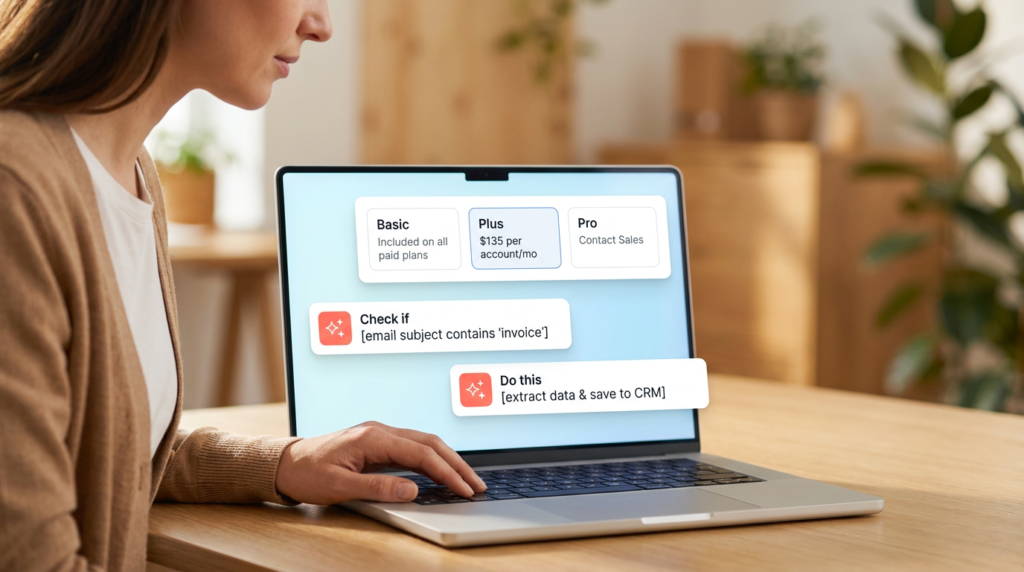
AI Studio Plus — $135/account/mo billed annually ($150/mo monthly). Available on Starter, Advanced, Enterprise, and Enterprise+ plans. Plus upgrades the credit volume to 100,000 credits per month per account, with additional credits purchasable in 100,000-credit increments.
This is a per-account charge, not per-seat — meaning a 10-person team pays $135/mo total for Plus, not $135 per person. Customers can purchase Plus directly in-product (help.asana.com).
AI Studio Pro — custom pricing (contact sales), annual only. Includes 5 million credits that reset quarterly, advanced billing controls, and live onboarding. Admins can manage which members access Pro credits via a builder list — all other users continue on Basic.
For teams running high-volume AI automation across large organizations (help.asana.com).
Timesheets and Budgets (add-on): Separate from AI Studio — this add-on tracks time against budgets and project health in real time, priced at $5.99/user/mo billed annually, available on Starter and above (asana.com).
For marketing agencies tracking billable time inside Asana, this adds meaningfully to the per-seat cost.
The practical implication: AI Studio Basic is included in your plan price at no extra cost. If your team needs higher AI credit volume, Plus at $135/account/mo is the next step — and at that price point, it’s relatively accessible for most teams compared to per-seat AI add-ons elsewhere.

Annual vs Monthly Billing — What’s the Saving?
Asana’s annual billing discount saves up to 18% across both paid tiers.
At Starter: $10.99/user/mo (annual) vs $13.49/user/mo (monthly) — a saving of $2.50/seat/mo, or $30/seat/year. For a 10-person team, that’s $300/year back by choosing annual billing.
At Advanced: $24.99/user/mo (annual) vs $30.49/user/mo (monthly) — a saving of $5.50/seat/mo, or $66/seat/year. For a 10-person team, that’s $660/year.
The trade-off: annual billing locks your seat count and plan for 12 months. If your team shrinks or your needs change mid-year, you don’t get a refund on unused seats.
For teams with stable headcount and a clear plan selection, annual billing is an easy call. For teams in growth or flux, monthly billing preserves flexibility at a meaningful cost premium.

How Asana Pricing Compares
At the entry paid tier, Asana Starter ($10.99/user/mo annual) comes in above ClickUp Unlimited ($7/user/mo) but below Monday.com Standard ($17/seat/mo) — and unlike Monday.com, Asana doesn’t impose a minimum seat count.
Wrike Team is $10/user/mo annual, slightly cheaper than Starter with a similar feature set for small teams.
The honest comparison: Asana costs more than ClickUp at every equivalent tier. What you’re paying for is a more structured, opinionated interface — Asana is faster to onboard and easier to keep organized than ClickUp, which requires more setup to reach the same functional state.
Whether that’s worth the per-seat premium depends entirely on how much your team values setup time vs. ongoing flexibility.
For a full plan-by-plan comparison, the Asana vs Monday breakdown covers where each tool wins and loses in detail.
If you’re specifically weighing Asana against ClickUp, that head-to-head goes deeper on the feature and value trade-offs.
FAQ
How much does Asana cost per month?
Asana’s Personal plan is free for up to 2 users. On annual billing, Starter is $10.99/user/mo and Advanced is $24.99/user/mo. Month-to-month rates are $13.49 and $30.49 respectively — annual billing saves up to 18%. Enterprise pricing is custom.
Add-ons including Timesheets and Budgets ($5.99/user/mo annual) and AI Teammates (custom pricing) are available on paid plans. All figures verified from asana.com/pricing, May 2026.
What is the difference between Asana Starter and Advanced?
Starter (previously Premium) covers timeline views, reporting dashboards, unlimited automations, forms, custom fields, and custom templates.
Advanced (previously Business) adds unlimited portfolios, goals tracking, workload management, approvals and proofing, time tracking, Salesforce and Tableau integration, and formulas.
The per-seat cost roughly doubles from Starter to Advanced.
The upgrade is justified for teams managing multiple simultaneous campaigns or needing workload visibility and executive-level reporting — not for teams doing straightforward project tracking.
Is the Asana free plan good enough for small teams?
Only if “small team” means one or two people. Asana’s Personal plan is capped at 2 users — it’s not a lite version of a team plan, it’s a personal productivity tool. For any team of three or more, Starter is the minimum viable plan.
The free plan also excludes timeline views, automations, custom fields, and reporting dashboards — the features that make Asana worth using for team coordination. Use Personal to evaluate the interface; don’t try to run a team on it.
Does Asana charge per user?
Yes — Asana’s Starter and Advanced plans are priced per user per month. There’s no minimum seat count, which is genuinely useful for small teams or those with variable contractor headcount.
Guests (external collaborators with limited access) are free on all paid plans — you’re only billed for full members. Enterprise pricing is negotiated and may include volume structures that differ from the published per-seat rates.
Bottom Line
For most teams moving off Asana’s free plan, Starter at $10.99/user/mo annual is the right call. It unlocks timelines, automations, reporting, and forms — the core features that make Asana useful for team project management rather than personal task tracking.
The no-seat-limit policy and unlimited free guests give it real flexibility for agencies and growing teams.
Move to Advanced when portfolio management, workload visibility, and approvals become genuine operational needs — not aspirational ones. At $24.99/seat/mo annual, the cost justification needs to be clear before upgrading.
If you’re still comparing Asana against other tools, my full project management software breakdown has current verified pricing across seven tools side by side.
Sources
- Asana Pricing — verified May 2026
- Asana AI Studio Add-on and Pricing — verified May 2026

Recent Posts

Monday.com Review 2026: Is It Still the Best Work OS?
I tested Monday.com against ClickUp, Asana, and Wr...
Updated July 27, 2026

AI Writing Software for Blogging in 2026: Best Tools + How to Stay AI-Search Vis...
The best AI writing software for blogging in 2026 ...
Updated July 20, 2026

HubSpot Review 2026: Is It Worth the Cost?
I tested HubSpot’s free CRM, Starter, and Pr...
Updated July 20, 2026

Teamwork.com Review 2026: Is It the Best PM Tool for Client Work?
I tested Teamwork.com for agency and client projec...
Updated May 29, 2026

Wrike Review 2026: Is It Worth the Cost?
I tested Wrike in real enterprise workflows. Here&...
Updated May 29, 2026

Asana Review 2026: Is It Worth It? (Honest, In-Depth Analysis)
I tested Asana across real team workflows. Here...
Updated May 29, 2026
Newsletter
Don't miss a thing!
Sign up to receive daily news