

 Tracy Jackson15 yrs in online marketing
Teamwork.Com Pricing in 2026: Which Plan is Best for Teams?
Table of Contents
Note on disambiguation: This article covers Teamwork.com, the project management platform built for agencies and client-services teams. If you landed here looking for Atlassian’s Teamwork Collection (a bundle of Jira, Confluence, and Loom) — that’s a completely different product. You want atlassian.com, not Teamwork.com.
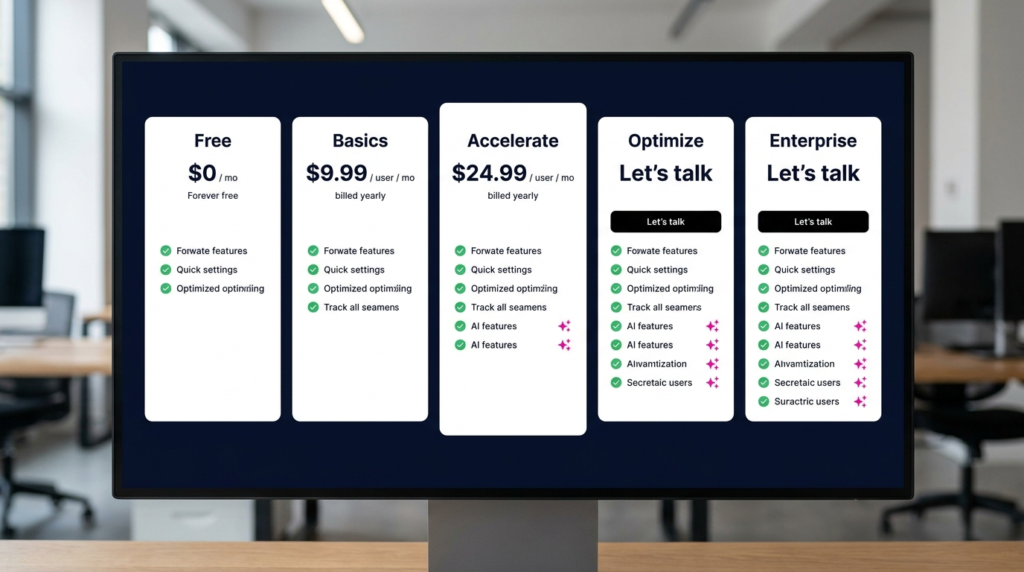
Teamwork.com pricing starts at $0 on the Free plan, $9.99/user/month (annual) on Basics, and $24.99/user/month (annual) on Accelerate. Optimize and Enterprise are custom-priced. Annual billing saves 29% compared to monthly. All plans include AI features — no separate AI add-on required.
Teamwork.com isn’t trying to be the best general-purpose project management tool.
It’s built specifically for agencies and client-services teams that need to manage projects, track billable time, handle retainers, and understand profitability by client — all in one place.
If that’s what you’re looking for, Teamwork pricing is what this article covers in full.
I’ve reviewed it alongside the rest of the field in my full marketing project management software comparison, and it’s the clearest choice for agencies that bill clients and need financial visibility inside their PM tool.
Current pricing at teamwork.com/pricing.
Disclaimer: If you buy something using the links in this article, I may receive a commission at no extra cost to you.
Know that I only promote stuff that I use and trust for the sake of my readers and the reputation of this site.
Teamwork.com Pricing at a Glance
Teamwork.com has four public-facing plans — Free, Basics, Accelerate, and Optimize — plus an Enterprise tier for larger organizations. Annual billing saves 29% vs monthly across all paid plans.
| Plan | Annual (per user/mo) | Monthly | Min Users | Free Plan | Best For |
|---|---|---|---|---|---|
| Free | $0 | $0 | — | Yes | Freelancers and micro-agencies trialling the product |
| Basics | $9.99 | ~$13.99 | 3 | — | Small teams managing 2–4 active clients |
| Accelerate | $24.99 | ~$34.99 | 5 | — | Growing agencies needing retainer and capacity management |
| Optimize | Custom | Custom | Contact sales | — | Agencies needing full profitability tracking and enterprise integrations |
| Enterprise | Custom | Custom | Contact sales | — | Large agencies requiring SSO, dedicated CSM, and advanced security |
All prices verified from teamwork.com/pricing — May 2026. Monthly rates are approximate — check teamwork.com for exact monthly pricing.
Teamwork.com Free: What You Get and Who It’s For
Price: $0. No credit card required. Maximum 5 users and 5 projects.
Teamwork.com’s free plan is more capable than most people expect.
It includes Gantt charts, board view, list view, table view, task templates, time logging, client organization, and 100 automations per month.
AI features are also included — comment summarization and the AI filter assistant are available on Free.
Storage is 100MB workspace-wide.
The hard limits that matter: 5 users and 5 projects are firm ceilings, not soft ones.
Five projects sounds like enough until you factor in internal admin projects, recurring client work, and the template project you use for onboarding.
Most agencies discover the project cap is the first wall they hit, often within the first 30 days of real use.
What Free doesn’t include: client user invites into projects, proofs for file review, time budgets, retainer management, or any billing or invoicing feature.
Those are exclusively paid plan territory — and for client-services teams, that’s most of what makes Teamwork worth paying for.
Verdict: Free is a genuine evaluation tool for freelancers and micro-agencies wanting to test Teamwork.com’s interface and project structure before committing.
It’s not a sustainable home for any agency managing more than a handful of clients simultaneously.
If you have more than 5 active projects running at once — and most agencies do — you’re already past the free plan.
Teamwork.com Basics: What You Get and Who It’s For
Price: $9.99/user/mo billed annually. Minimum 3 users. (~$13.99/user/mo monthly.)
Basics is the entry paid tier, and it unlocks the core of what makes Teamwork.com useful for client-facing teams.
Up to 300 projects, 100GB storage, and 5,000 automations per month.
The plan adds client collaboration — you can invite client users into projects so they can view progress and leave feedback without needing a paid seat.
File proofs (20 per month) enable structured feedback and sign-off on deliverables.
Key features on Basics:
- Up to 300 projects and unlimited templates
- Invite client users into projects (clients don’t count as paid seats)
- 20 file proofs per month for client feedback and approvals
- Basic time tracking and timesheet reporting
- Report on progress and time spent; compare planned vs actuals
- AI comment summarization — get the highlights from a busy task thread without reading every reply
- HubSpot and QuickBooks integrations are not yet available at this tier (those unlock on Accelerate)
- 5,000 automations per month (teamwork.com)
What Basics doesn’t include: retainer management, budget tracking, workload planning, the HubSpot and QuickBooks integrations, and invoicing.
For agencies running straightforward project work without complex billing needs, Basics covers the essentials.
For agencies that need to track billable hours against budgets and generate client invoices, Accelerate is the minimum viable plan.
Verdict: Basics suits small agencies managing 2–4 active clients with relatively straightforward deliverable tracking.
The 3-user minimum means the entry cost is $29.97/mo for a solo operator — manageable. The client invite feature and proofs are the reasons to upgrade from Free.
When you need retainer tracking or time budgets, you’ll move to Accelerate.
Teamwork.com Accelerate: What You Get and Who It’s For
Price: $24.99/user/mo billed annually. Minimum 5 users. (~$34.99/user/mo monthly.)
Accelerate is where most growing agencies land — and it’s the plan that delivers Teamwork.com’s core agency value proposition.
The feature unlocks at this tier are substantial: time budgets and retainer management, workload planning, unlimited file proofs, HubSpot and QuickBooks integrations, custom branding and domain, and AI-powered capacity and utilization views.
The retainer feature is the one that sets this tier apart from anything comparable in ClickUp or Asana at similar price points.
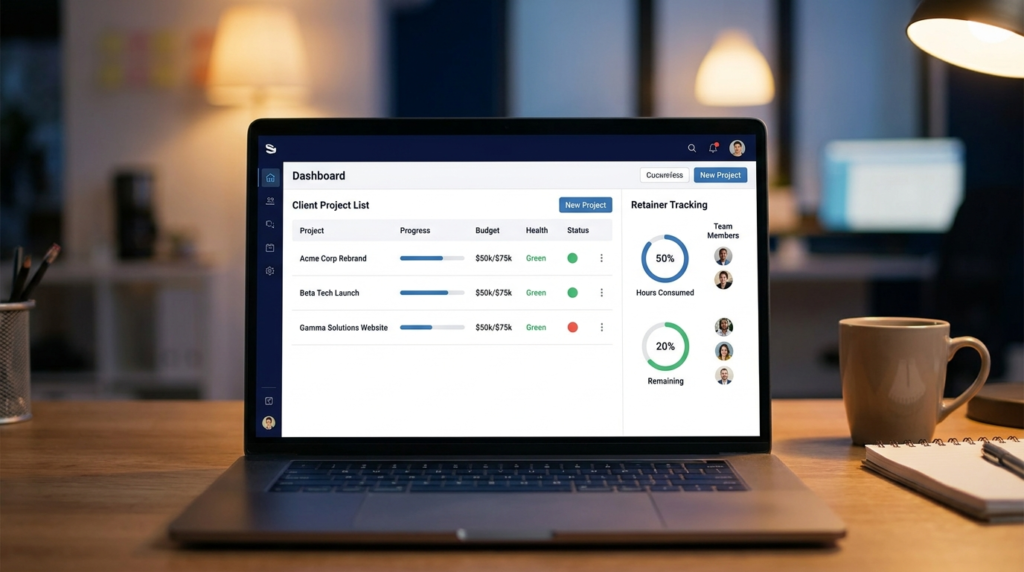
Unlimited time and cost retainers let agencies track recurring client budgets month to month — with visibility into how much retainer time has been consumed, how much remains, and whether the team is running over or under.
For any agency managing ongoing retainer relationships, this is table stakes.
Key features on Accelerate:
- 600 projects, 250GB storage, 20,000 automations per month
- Unlimited file proofs — no monthly cap on client review and approvals
- Unlimited time and cost retainers — track recurring client budgets
- Basic client invoicing (time-logged hours billed at set rates)
- Workload planning — see team capacity and schedule work against availability
- HubSpot and QuickBooks integrations — connect your CRM and accounting stack
- Custom branding and your own domain for client-facing views
- AI capacity and utilization summary — see who’s over-capacity and who’s underused with one click (teamwork.com)
- Timesheet review and approval workflow
The minimum seat reality: 5 seats at $24.99 = $124.95/mo minimum. That’s the true entry cost for Accelerate.
For a 3-person agency, you’re paying for 5 seats. Worth knowing before you start a trial.
Verdict: Accelerate is the right plan for most 5–20 person agencies running active client retainers.
The retainer tracking, unlimited proofs, and AI capacity view are genuinely agency-specific features that justify the per-seat cost over generalist tools.
If your agency is invoicing clients and managing recurring budgets, this is where Teamwork.com starts earning its keep.
Teamwork.com Optimize: What You Get and Who It’s For
Price: Custom — contact Teamwork.com sales. Annual contract. Unlimited projects and users.
Optimize is built for service businesses that need financial accountability at the project and portfolio level — not just time tracking, but actual profitability visibility.
The plan adds the full financial management layer: fixed-fee budget tracking, multi-currency support, client invoicing with margin, tax, and discount support, revenue and cost insights per project and client, and AI-powered profitability forecasting.
What Optimize adds over Accelerate:
- AI profitability forecasting — data-backed predictions for revenue, costs, and profit by project and client; early warning on scope creep before it hits the bottom line (teamwork.com)
- Track profit by project or client — understand which clients and projects are actually making money
- Revenue and cost insights — real-time visibility across the portfolio
- Fixed-fee budget management — track against agreed project fees, not just hours
- Multi-currency support — for agencies billing international clients in local currencies
- Full invoicing — including margin, tax, and discount calculations
- Build client-ready quotes — create and send quotes; turn approved quotes into scheduled projects
- Turn CRM pipeline into projects — convert won deals directly into Teamwork projects
- Salesforce and NetSuite integrations — enterprise CRM and ERP connectivity
- Smart-assign work with AI — AI suggests the best team member for each task based on availability and skills
- 100,000 automations per month; advanced report filtering and custom reports
Verdict: Optimize is for agencies where the question “are we profitable on this client?” needs a data answer, not a gut feel.
The AI profitability forecasting and project-level financial visibility are the strongest differentiators Teamwork.com has over ClickUp, Asana, or Monday.com at any tier.
If your agency does $1M+ in annual billings and margins matter at the project level, the conversation with Teamwork sales is worth having.
Teamwork.com Enterprise: What You Get and Who It’s For
Price: Custom — contact Teamwork.com sales. 1TB storage, 100,000 automations per month.
Enterprise adds the governance and security layer that larger organizations or agencies with enterprise clients require: Single Sign-On (SSO), dedicated infrastructure, advanced access policies, a dedicated Customer Success Manager, premium support, and 10 hours of technical services for API work, data migration, and custom integrations.
This is the tier for agencies where IT or procurement is involved in the buying decision, or where enterprise clients require security certifications and data residency documentation before allowing tool access.
Enterprise also increases API rate limits to 500 requests/minute — relevant for agencies building custom integrations between Teamwork.com and their own systems.
Verdict: Enterprise is a compliance and support tier, not a features tier.
The feature set is essentially the same as Optimize — the meaningful additions are SSO, dedicated infrastructure, a CSM, and the technical services hours.
If your procurement team needs a dedicated point of contact and SLA-backed support before signing, that’s the path.

Why Agencies Choose Teamwork.com
Most project management tools are built for internal teams. Teamwork.com is built for teams that bill clients — and the difference shows in the features that no competitor at this price point offers together.
Client portals without extra seats. Invite clients to view project progress, leave feedback, and approve deliverables directly in Teamwork.com.
Clients don’t count as paid users.
For agencies managing 10+ clients, the cost saving compared to tools that charge per seat for every stakeholder is meaningful.
Built-in time tracking and billing. Time logged in Teamwork.com is invoice-ready — set billable rates by user, role, or client; track billable vs non-billable hours; generate invoices with margin, tax, and discounts applied.
No separate time tracking tool, no export-to-spreadsheet step. The billing workflow lives where the work happens.
Retainer management. Track recurring client budgets over time — how much retainer time has been used, how much remains, and whether the team is consuming retainer hours at the right pace.
Available on Accelerate and above.
Profitability reporting. See actual revenue, costs, and profit by project and client — not just completion rates and time logged.
Identify which clients are profitable, which are scope-creeping, and which engagements need to be repriced. The AI profitability forecasting on Optimize gives early warning before a project goes underwater.
This is the feature no competing review article mentions and the one most agency principals actually care about.
TeamworkAI — included in every plan. Teamwork.com’s AI features are built into the platform, not sold as a separate add-on. On Basics: AI comment summarization and filter assistant.
On Accelerate: AI utilization summary and capacity views. On Optimize and above: AI smart-assign and AI profitability forecasting.
The MCP server integration connects Teamwork.com to Claude, ChatGPT, Copilot, and Gemini — creating tasks, tracking milestones, and analyzing project health from any connected AI tool.
Data is never used to train third-party models (teamwork.com).
Compared to ClickUp or Asana, Teamwork.com’s client billing, retainer tracking, and profitability reporting are native and complete at the Accelerate and Optimize tiers.
ClickUp and Asana don’t offer invoicing.
Neither tracks project profitability. For agencies whose primary pain is not “how do I track tasks” but “how do I know if we’re making money on this client” — Teamwork.com is the only tool in this cluster that answers that question.
Is the Teamwork.com Free Plan Good Enough?
For a freelancer or a two-person operation just getting started with structured project management — yes, with limits.
The Free plan includes Gantt charts, board view, time logging, task dependencies, milestones, basic AI features, and client organization.
That’s a real toolkit at $0. The ceiling is 5 users and 5 projects, and both limits are firm.
In practice, 5 projects fills up faster than expected.
An agency with three active clients, one internal operations project, and a template project for onboarding is already at five.
The 100MB storage cap is also genuinely restrictive for any team working with design files or large documents.
What the free plan doesn’t support: client invites into projects, file proofs, time budgets, retainer management, and any invoicing feature.
These are the core of Teamwork.com’s agency value proposition — and none of them are available until Basics.
Bottom line on free: Use it to evaluate whether Teamwork.com’s interface fits how your team thinks. Don’t expect to run real client work on it past the first month.

Annual vs Monthly Billing — What’s the Saving?
Teamwork.com’s annual billing saves 29% compared to monthly — one of the larger annual discounts in this category.
At Basics: approximately $9.99/user/mo (annual) vs ~$13.99/user/mo (monthly). For a 5-person team, that’s roughly $240/year saved by choosing annual.
At Accelerate: $24.99/user/mo (annual) vs ~$34.99/user/mo (monthly). For a 10-person team, that’s approximately $1,200/year — real money at a growing agency.
The trade-off is the same as any annual subscription: you’re committed for 12 months.
Plan upgrades are available at any time; downgrades take effect at the next renewal date.
For agencies with stable headcount and a clear plan selection, annual billing is a straightforward call.
The 30-day free trial on Basics and Accelerate gives enough time to validate the fit before committing annually.
What About Teamwork CRM?
Quick disambiguation for anyone who landed here searching for “Teamwork CRM pricing” — Teamwork CRM is a separate Teamwork product for sales pipeline and CRM management.
It has its own pricing and is not the same as Teamwork.com Projects, which is what this article covers.
If you need CRM and sales pipeline management, visit teamwork.com/crm/ for that product’s details.
The two products can be used together, but they are separately priced and separately evaluated.
The Teamwork.com Projects pricing in this article does not include Teamwork CRM.
FAQ
What is Teamwork.com pricing?
Teamwork.com has five plans: Free ($0, max 5 users and 5 projects), Basics ($9.99/user/mo annual, min 3 users), Accelerate ($24.99/user/mo annual, min 5 users), and Optimize and Enterprise (both custom-priced, contact sales).
Annual billing saves 29% vs monthly. All plans include AI features — Teamwork.com does not charge separately for AI.
Prices verified from teamwork.com/pricing, May 2026.
Is Teamwork.com free?
Yes. Teamwork.com has a free plan that’s permanently free — no trial period, no credit card required.
The Free plan supports up to 5 users and 5 projects, includes Gantt charts, board view, time logging, task dependencies, basic AI features, and 100 automations per month.
The project cap and 100MB storage limit are the main constraints. It’s a genuine evaluation tool for freelancers and small teams, but most agencies outgrow it within the first month of real client work.
How much does Teamwork.com cost per user?
Published per-seat pricing is $9.99/user/mo on Basics (annual) and $24.99/user/mo on Accelerate (annual). Optimize and Enterprise are custom-priced.
The minimum seat requirements — 3 seats on Basics, 5 seats on Accelerate — mean the real entry costs are $29.97/mo and $124.95/mo respectively.
Annual billing saves 29% vs monthly. Prices verified from teamwork.com/pricing, May 2026.
Is Teamwork.com good for agencies?
Yes — it’s the PM tool most specifically built for client-services agencies.
The features that make it worth it for agency work: client portals where clients can view project progress without a paid seat, native time tracking with invoice-ready billing, retainer management for tracking recurring client budgets, and profitability reporting by project and client.
No other tool in this price range offers all of these natively. The AI profitability forecasting on Optimize gives agencies early warning when a project is trending toward a loss.
For agencies comparing Teamwork.com against ClickUp, Asana, or Monday.com, the full project management software comparison covers all four tools side by side.
What is the difference between Teamwork.com plans?
The most important plan decision for most agencies is Basics vs Accelerate.
Basics ($9.99/user/mo) covers project management, client invites, basic time reporting, and 20 proofs per month — right for agencies managing straightforward deliverable work.
Accelerate ($24.99/user/mo) adds retainer management, unlimited proofs, workload planning, HubSpot and QuickBooks integrations, client invoicing, and AI capacity views — the full agency toolkit for teams managing recurring client relationships.
Optimize adds profitability reporting, AI forecasting, multi-currency support, and Salesforce integration — for agencies where project-level financial visibility is critical.
Enterprise adds SSO, a dedicated CSM, and advanced security for larger or compliance-driven organizations.
Bottom Line
For freelancers and micro-agencies just getting organized: start with Free, hit the project cap, then move to Basics.
The 30-day trial makes the evaluation low-risk.
For most 5–20 person agencies running client retainers: Accelerate is the plan. The retainer tracking, unlimited proofs, workload planning, and AI capacity views are why you’d choose Teamwork.com over a generalist tool.
The 5-seat minimum and $124.95/mo entry cost are the honest trade-offs.
For agencies where profitability tracking is non-negotiable: have the Optimize conversation.
AI profitability forecasting, project-level revenue and cost visibility, and Salesforce integration are features that no other tool in this cluster offers at any price.
If you’re still comparing Teamwork.com against ClickUp, Asana, Wrike, or Monday.com before making a decision, my full marketing project management software comparison covers all of them with current verified pricing.
Sources
- Teamwork.com Pricing — verified May 2026
- TeamworkAI — verified May 2026

Recent Posts

Monday.com Review 2026: Is It Still the Best Work OS?
I tested Monday.com against ClickUp, Asana, and Wr...
Updated July 27, 2026

AI Writing Software for Blogging in 2026: Best Tools + How to Stay AI-Search Vis...
The best AI writing software for blogging in 2026 ...
Updated July 20, 2026

HubSpot Review 2026: Is It Worth the Cost?
I tested HubSpot’s free CRM, Starter, and Pr...
Updated July 20, 2026

Teamwork.com Review 2026: Is It the Best PM Tool for Client Work?
I tested Teamwork.com for agency and client projec...
Updated May 29, 2026

Wrike Review 2026: Is It Worth the Cost?
I tested Wrike in real enterprise workflows. Here&...
Updated May 29, 2026

Asana Review 2026: Is It Worth It? (Honest, In-Depth Analysis)
I tested Asana across real team workflows. Here...
Updated May 29, 2026
Newsletter
Don't miss a thing!
Sign up to receive daily news