
 Tracy Jackson15 yrs in online marketing
ClickUp Pricing in 2026: What’s The Real Price for Plans?
Table of Contents
ClickUp’s pricing looks simple until you actually dig in. Four core plans, per-seat costs that compound fast for growing teams, and a free plan with real limits that don’t announce themselves until you hit them.
This article breaks down every current ClickUp plan, what you actually get on each tier, and which one makes sense for your team — so you’re not guessing when it’s time to upgrade.
If you’re still in the early stages of evaluating tools, I cover ClickUp alongside seven other options in my full marketing project management software comparison.
But if you’ve already landed on ClickUp and just need to figure out which ClickUp pricing plan to buy, you’re in the right place.
Disclaimer: If you buy something using the links in this article, I may receive a commission at no extra cost to you.
Know that I only promote stuff that I use and trust for the sake of my readers and the reputation of this site.
ClickUp Pricing at a Glance
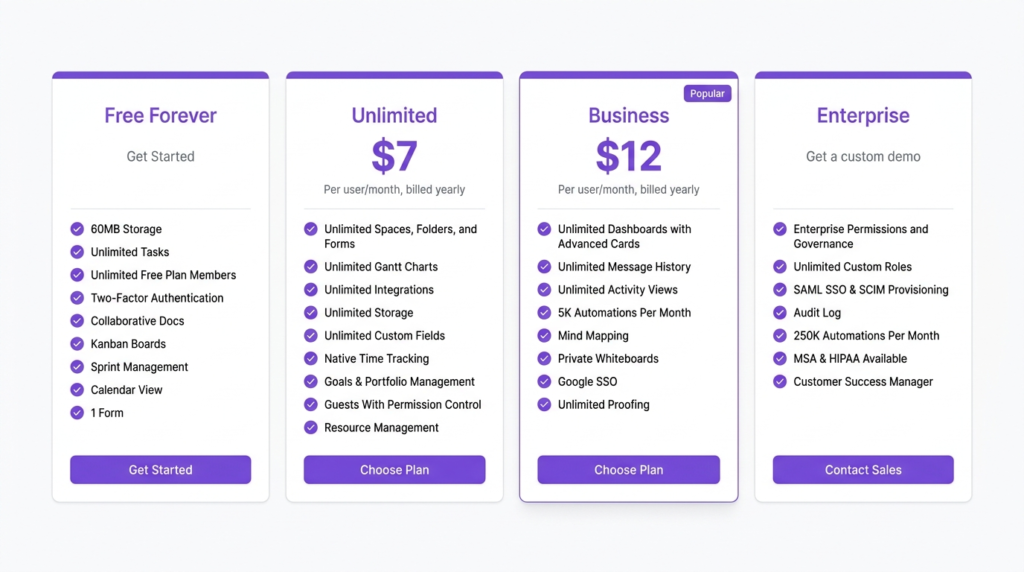
ClickUp costs $0 for individuals on the Free Forever plan, $7/user/month (annual) for the Unlimited plan, and $12/user/month (annual) for Business. Enterprise pricing is custom. Annual billing saves approximately 25–30% compared to paying month-to-month.
| Plan | Annual (per user/mo) | Monthly (per user/mo) | Free Plan | Best For |
|---|---|---|---|---|
| Free Forever | $0 | $0 | Yes | Solo users, very small teams testing ClickUp |
| Unlimited | $7 | $10 | — | Small to mid-size teams ready to move off free |
| Business | $12 | $19 | — | Teams needing advanced automations and dashboards |
| Enterprise | Custom | Custom | — | Large orgs with security and procurement requirements |
All prices verified from clickup.com/pricing — May 2026. Prices may change; check clickup.com/pricing for current rates.

ClickUp Pricing Plans: Full Breakdown
ClickUp Free Forever: What You Get and Who It’s For
The Free Forever plan is genuinely one of the better free tiers in project management software — but it has a ceiling, and teams tend to hit it faster than they expect.
Price: $0, no credit card required, unlimited members.
What works well: unlimited tasks, unlimited members, collaborative docs, Kanban boards, calendar view, sprint management, basic custom fields, in-app video recording, and 24/7 support.
For a solo user or a two-person team running straightforward projects, that’s a real set of tools.
Where it falls apart:
- 100MB total storage — this is the limit that catches teams off guard most often. If you’re attaching creative assets, brand files, or any kind of media to tasks, 100MB goes fast. It’s not a per-user limit; it’s workspace-wide.
- 1 Form — useful for intake, but you’ll hit the cap quickly if you run multiple client workflows.
- No automations — none. Every status update, assignment, and notification is manual.
- Limited integrations — the integrations wall on Free is real. Many of the connections teams actually use (HubSpot, Salesforce, Zapier at scale) require a paid plan.
- No timeline or Gantt view — available on Free in limited form but Gantt filtering and critical paths require Unlimited or above.
Verdict: Free Forever is a legitimate starting point for individuals and small teams who want to evaluate ClickUp before committing.
It’s not a long-term home for any team doing real volume — the storage cap and automation lockout will push you to upgrade faster than the seat count does.
ClickUp Unlimited: What You Get and Who It’s For
Unlimited is the plan most growing teams land on, and for good reason. The jump from Free is significant — and at $7/user/mo annual, it’s one of the better-value paid tiers in the project management category.
Price: $7/user/mo billed annually; $10/user/mo billed monthly.
The name is a little misleading — it doesn’t mean unlimited everything — but the key unlocks are meaningful:
- Unlimited storage — the 100MB cap disappears entirely.
- Unlimited integrations — Slack, Google Drive, HubSpot, GitHub, and hundreds more are fully accessible.
- Unlimited Gantt charts — timeline planning becomes a real option for project management.
- Unlimited custom fields — no more workarounds for tracking campaign status, content type, or client name.
- 5,000 automations per month — enough for most teams running standard workflow triggers (status changes, due date reminders, task assignments).
- Guests with permission controls — bring in clients or contractors without giving them full workspace access.
- Resource management — basic workload view to see who’s over capacity.
What you still don’t get on Unlimited: advanced dashboard features (custom chart types are limited), workload management at full depth, and the time tracking features that some billing-focused teams need.
Verdict: Unlimited is the right plan for most teams of 5–20 people doing real project work. If you’re on Free and running into storage issues, automation limits, or integration walls — Unlimited fixes all three in one step.
At $7/seat annually, the cost is easy to justify against the alternatives.
ClickUp Business: What You Get and Who It’s For
Business is where ClickUp becomes a serious operations platform. The jump from Unlimited ($7) to Business ($12) is relatively modest in dollar terms, but the feature delta is meaningful for specific use cases.
Price: $12/user/mo billed annually; $19/user/mo billed monthly.
What Business adds over Unlimited:
- Unlimited teams — useful for agencies or larger orgs managing separate departments or client groups in the same workspace.
- Advanced automations — 20,000 actions/mo — a significant jump from Unlimited’s 5,000. Relevant for teams running complex multi-step workflows across campaigns or client accounts.
- Advanced dashboard cards — custom chart types, calculated fields, and cross-workspace reporting become accessible.
- Workload management — the full capacity planning view with workload by assignee, time estimates vs. actuals, and sprint velocity.
- 5,000 automations per month on Unlimited vs 20,000 on Business — if your team hits the automation cap regularly, Business pays for itself.
- Google SSO — useful for teams on Google Workspace who want streamlined login management.
- Unlimited proofing — full creative review and approval workflow built into ClickUp without a separate tool.
- Sprint points and reporting — relevant for marketing teams running agile sprints.
Who actually needs Business: teams that are hitting automation limits on Unlimited, agencies managing multiple client groups who need separate team structures, and anyone relying on ClickUp dashboards as a reporting tool for stakeholders.
If you’re on Unlimited and none of those sound familiar, stay on Unlimited.
Verdict: Business is a strong plan for 15–50 person teams running complex workflows. It’s not necessary for most teams under 15 people unless automations are core to how the team operates.
The $5/seat/mo premium over Unlimited is easy to justify if you’re maxing out automations — and hard to justify if you’re not.
ClickUp Enterprise: What You Get and Who It’s For
Enterprise pricing is custom — you won’t find a number on ClickUp’s pricing page, and the “Contact Sales” button is the only path in. That’s worth understanding before you invest time in an evaluation.
Price: Custom — contact ClickUp sales.
What Enterprise adds over Business:
- Enterprise permissions and governance — granular access controls at the workspace, space, and folder level.
- Unlimited custom roles — define permission sets beyond the standard member/guest/admin framework.
- SAML SSO and SCIM provisioning — required for most enterprise IT environments doing centralized identity management.
- Audit log — full activity history for compliance and security reviews.
- MSA and HIPAA availability — for orgs in regulated industries.
- 250,000 automations per month — enterprise-scale workflow volume.
- Customer success manager — dedicated onboarding and ongoing support.
- Live onboarding training and access to managed services.
Who actually needs Enterprise: organizations with IT procurement requirements, regulated industries needing HIPAA compliance, and large teams (100+ seats) where SSO and role-based access controls are non-negotiable.
Enterprise isn’t just about features — it’s about the security posture, the contractual terms, and the support tier. If your procurement team needs an MSA before signing, Enterprise is the path.
Verdict: Enterprise is not a “large team” plan — it’s a compliance and governance plan. A 200-person company that doesn’t have IT security requirements is often better served by Business at lower cost.
The list price for Enterprise is a ceiling, not a floor — negotiated annual contracts for large seat counts typically come in below what you’d calculate from per-seat rates.

ClickUp Free Plan — Is It Actually Useful?
Short answer: yes, with real caveats.
For a solo user or a two-person team, ClickUp Free Forever is one of the most functional free plans in this category. Unlimited tasks, unlimited members, collaborative docs, Kanban, calendar, sprint management — that’s a real set of tools at $0.
The limits that matter most in practice:
Storage (100MB workspace-wide) is the earliest wall most teams hit. If you’re using ClickUp to manage a content or creative workflow — attaching briefs, images, or any kind of file — 100MB goes in weeks, not months.
This isn’t a per-user cap; it’s total storage for the entire workspace, which makes it more restrictive than it sounds.
No automations means every recurring task, status update, and reminder is manual. For a solo user running simple projects, that’s fine. For a team of five or more trying to reduce admin overhead, the lack of automation is genuinely limiting.
One Form covers basic intake needs but breaks down quickly if you’re managing multiple client workflows or content request pipelines.
The free plan is genuinely useful for: testing ClickUp before a paid commitment, managing personal projects, or running a very small team with simple needs and minimal file storage requirements.
It’s not a long-term home for any team doing real marketing or agency work.

ClickUp Add-Ons and Hidden Costs
The headline plan prices are real — but there are a few cost layers worth knowing about before you budget.
ClickUp AI (Brain and Everything AI plans): ClickUp has restructured its AI offering into separate plan tiers. Brain AI is $9/user/mo (annual) and Everything AI is $28/user/mo (annual) — these are AI-centric plans that sit alongside the core PM plans rather than as simple add-ons.
If AI-assisted writing, task summarization, and automation are important to your workflow, factor these into your per-seat cost from the start. The free plan includes trial access to AI features, but ongoing use requires a paid AI tier.
Guests: On the Unlimited plan and above, guests can be invited with permission controls and don’t count as full members — useful for client collaboration without inflating your seat count.
Check current guest permissions on ClickUp’s pricing page, as these terms have changed before.
Enterprise negotiated pricing: For large organizations, the per-seat rates on ClickUp’s public pricing page are a starting point, not a final number.
Enterprise contracts are negotiated — volume discounts apply, and annual multi-year commitments typically come with additional reductions.
How ClickUp Pricing Compares
ClickUp’s Unlimited plan at $7/user/mo annual is one of the lowest entry prices among full-featured project management tools. Asana Starter comes in at $10.99/user/mo annual; Monday.com Basic starts at $12/seat/mo with a 3-seat minimum and no free plan.
Wrike Team is $10/user/mo annual. On pure per-seat cost, ClickUp wins the entry tier comparison — though Asana’s cleaner onboarding and more structured workflows may offset that for teams who value ease of setup over flexibility.
For a full plan-by-plan head-to-head, the ClickUp vs Asana comparison covers where each tool wins and loses in detail. If you’re also weighing Asana against Monday.com, that comparison is worth reading before you decide.
FAQ
How much does ClickUp cost per month?
ClickUp’s Free Forever plan costs $0. On annual billing, the Unlimited plan is $7/user/mo and Business is $12/user/mo. If you pay month-to-month, those rates rise to $10 and $19 respectively — annual billing saves roughly 25–30% depending on the plan.
Enterprise pricing is custom and requires contacting ClickUp sales. All figures verified from clickup.com/pricing, May 2026.
Is the ClickUp free plan good enough for small teams?
For very small teams — two to four people running straightforward projects without heavy file storage needs — ClickUp Free Forever is a genuinely useful tool. The limits that matter most are the 100MB workspace storage cap, the absence of automations, and the single form limit.
Teams storing creative assets or running any kind of automated workflow will hit those limits quickly. If your team is five or more people doing real marketing work, the Unlimited plan at $7/user/mo annual is worth the upgrade.
What is the difference between ClickUp Unlimited and Business?
The most meaningful differences are automation volume (5,000 actions/mo on Unlimited vs 20,000 on Business), advanced dashboard capabilities, workload management depth, unlimited proofing for creative review, and Google SSO.
Business also adds unlimited teams — useful for agencies managing separate client groups in the same workspace. If your team isn’t hitting automation limits and doesn’t need advanced reporting, Unlimited covers most use cases at a lower per-seat cost.
Does ClickUp charge per user?
Yes — ClickUp’s paid plans are priced per user per month. The exception is Enterprise, which is negotiated and may include volume-based pricing structures.
Guests (external collaborators with limited permissions) are handled differently from full members — check current guest terms at clickup.com/pricing since these have changed in past plan updates.
Bottom Line
For most teams, ClickUp Unlimited at $7/user/mo annual is the right starting point. It fixes the three most common free plan pain points — storage, automations, and integrations — without overpaying for features most teams don’t yet need.
Move to Business when you’re consistently hitting the automation limit or when workload visibility and advanced dashboards become genuine operational needs, not nice-to-haves.
If you’re still comparing ClickUp against other tools before committing, my full project management software breakdown covers ClickUp alongside Asana, Monday.com, Teamwork, and more with current verified pricing across every tool.
Sources
- ClickUp Pricing — verified May 2026

Recent Posts

Monday.com Review 2026: Is It Still the Best Work OS?
I tested Monday.com against ClickUp, Asana, and Wr...
Updated July 27, 2026

AI Writing Software for Blogging in 2026: Best Tools + How to Stay AI-Search Vis...
The best AI writing software for blogging in 2026 ...
Updated July 20, 2026

HubSpot Review 2026: Is It Worth the Cost?
I tested HubSpot’s free CRM, Starter, and Pr...
Updated July 20, 2026

Teamwork.com Review 2026: Is It the Best PM Tool for Client Work?
I tested Teamwork.com for agency and client projec...
Updated May 29, 2026

Wrike Review 2026: Is It Worth the Cost?
I tested Wrike in real enterprise workflows. Here&...
Updated May 29, 2026

Asana Review 2026: Is It Worth It? (Honest, In-Depth Analysis)
I tested Asana across real team workflows. Here...
Updated May 29, 2026
Newsletter
Don't miss a thing!
Sign up to receive daily news