

 Tracy Jackson15 yrs in online marketing
Asana for Nonprofits: 50% Discount, Eligibility & How to Apply (2026)
Table of Contents
The short answer: Asana offers a 50% discount on paid Starter and Advanced annual plans for eligible nonprofits — not just a free tier with capped seats, but half price on the same plans commercial teams pay full price for. The application runs through Goodstack, and approval typically takes 1–2 business days.
I’ve written about the best software for nonprofits across five categories, and asana for nonprofits is consistently the discount program I point smaller organizations to first.
The 50% off figure is real, it applies to paid plans (not just the free tier), and the application process is straightforward.
In this article I’ll walk through who qualifies, exactly what you pay after the discount, and how to apply.
Here’s the Asana nonprofit program page if you want to jump straight there.

What Is the Asana Nonprofit Program?
Asana’s nonprofit program gives eligible 501(c)(3) organizations 50% off Starter and Advanced annual plans.
The discount applies at checkout when you upgrade from the free Personal plan, after Goodstack (formerly Percent) — Asana’s third-party verification partner — confirms your eligibility.
Here’s the thing: this is not the same as the free Personal plan that anyone can sign up for.
The Personal plan is free for up to 10 users with basic task management — no timeline views, no workflow automations, no dashboards.
The nonprofit discount program is a separate track that unlocks the full Starter or Advanced feature set at half the commercial price.
Those are two different things, and a lot of nonprofits miss the distinction entirely and end up stuck on the free tier when they could be paying ~$5.50/seat for the real thing.
The program covers US nonprofits and international organizations with equivalent designations — it’s not US-only.

Does Your Nonprofit Qualify for the Asana Discount?
Who is eligible
- US-based 501(c)(3) organizations
- Public libraries with valid nonprofit status
- International organizations with equivalent nonprofit designations in their country
If your organization is registered with the IRS as a 501(c)(3), you almost certainly qualify.
Goodstack has a broad eligibility framework and handles the verification — I haven’t seen cases where a standard 501(c)(3) gets rejected.
Who is not eligible
- Hospitals and hospital auxiliaries — explicitly excluded, full stop
- Organizations that don’t align with the anti-discrimination policies of Asana’s verification partners (Goodstack/TechSoup)
- K-12 schools and higher education institutions — these go through Asana’s Education program, not the nonprofit program
The hospital exclusion is firm regardless of tax-exempt status.
For everyone else, the fastest way to confirm eligibility is to just start the application — Goodstack’s verification will confirm it or flag any issues quickly.
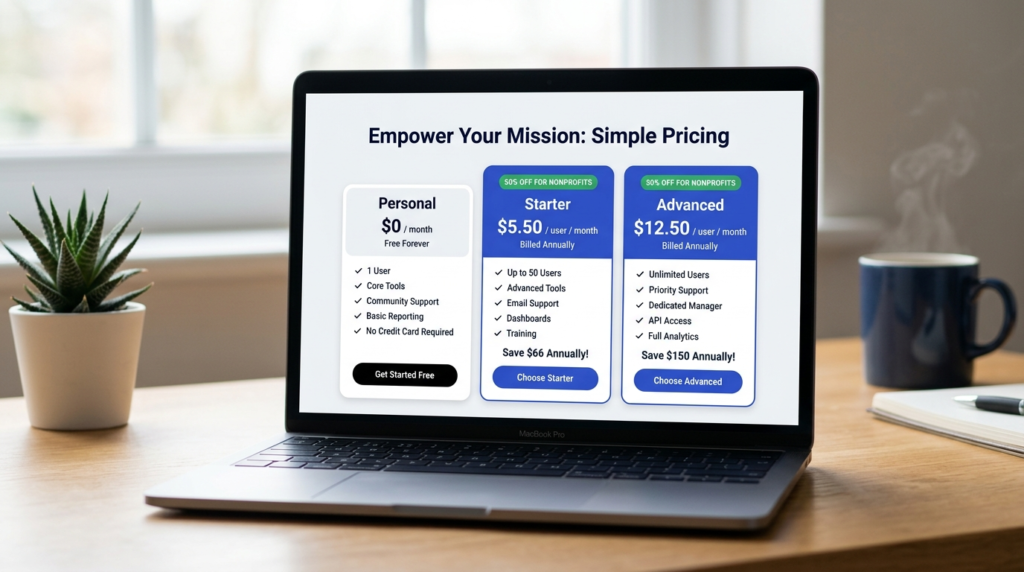
Asana Nonprofit Pricing: What You Pay After the 50% Discount
This is the table I couldn’t find anywhere else when I was putting this together — all three relevant plans with the post-discount nonprofit price filled in.
| Plan | Who it’s for | Standard price (annual, per seat/mo) | Nonprofit price (annual, per seat/mo) |
| Personal (Free) | Teams up to 10 | $0 | $0 (no discount needed) |
| Starter | Growing teams | $10.99 | ~$5.50 (50% off) |
| Advanced | Complex workflows | $24.99 | ~$12.50 (50% off) |
| Enterprise | Large orgs | Custom | Contact Asana sales |
Prices verified May 2026. Subject to change — confirm at asana.com/industry/nonprofit before applying.
For a 10-person nonprofit team, that’s roughly $55/month on discounted Starter versus $109.90/month at the commercial rate.
On discounted Advanced, approximately $125/month versus $249.90/month. The savings are real and they compound fast as you add seats.
One thing worth flagging: annual billing means paying for the full year upfront (billed as one payment per year, not monthly).
The nonprofit discount applies to annual plans only — there’s no discounted month-to-month option.
For organizations managing cash flow tightly, that’s worth factoring in before applying.
For the full commercial plan breakdown, see my full Asana pricing breakdown.
Free plan vs. discounted Starter vs. discounted Advanced — which do you actually need?
When the free Personal plan is enough: Your team is under 10 people, basic task lists and project tracking cover what you need, and you’re not running multi-step workflows.
For a small nonprofit just moving off spreadsheets, the free plan honestly handles a lot.
When to upgrade to discounted Starter: You need Timeline views for grant deadlines or event planning, you want workflow automations to handle routine task assignments and status updates, or you’re using intake forms for program applications or volunteer sign-ups.
At ~$5.50/seat/month after the discount, it’s hard to argue against it.
When to consider discounted Advanced: You’re managing multiple programs simultaneously and need portfolio views, you want OKR-style goal tracking connected to day-to-day work, or you need workload management across your team.
Advanced is built for organizations running several programs at once — it’s the management-layer tier.

How to Apply for the Asana Nonprofit Discount: Step by Step
- Confirm eligibility. Make sure your organization holds 501(c)(3) status (US) or an equivalent international designation. Hospitals and hospital auxiliaries are excluded.
- Go to the nonprofit application page. Navigate to asana.com/industry/nonprofit — not the standard pricing page. The nonprofit program has its own entry point and checkout flow.
- Enter your user count. Asana uses your seat count to route you to the correct verification flow.
- Complete Goodstack verification. You’ll receive a short form by email. Goodstack typically confirms eligibility within 1–2 business days.
- Apply your discount code. Once approved, Goodstack emails your code. Apply it at checkout when upgrading from the free Personal plan to Starter or Advanced on an annual plan.
Apply for the Asana nonprofit discount → asana.com/industry/nonprofit
Approval typically takes 1–2 business days. You can apply while your team continues using the free Personal plan in the meantime.

The Asana Advisors Bonus: What Nonprofit Members Get
I haven’t seen this mentioned in any third-party article on this topic, which is a miss — it’s a real differentiator.
Nonprofit program members get access to Asana Advisors, a pro-bono expert consultation program available exclusively to approved nonprofit organizations.
The idea is that Asana connects nonprofit members with implementation experts who can help set up workflows, structure projects, and get the team actually using the platform effectively — not just signed up for it.
Asana’s program page doesn’t specify a session cap, so I’m not going to invent one. What I can say is that commercial teams on Starter and Advanced don’t have access to this at all.
For a small nonprofit without a dedicated ops or IT person, it’s a meaningful benefit that has nothing to do with the discount.
Access unlocks after nonprofit program approval — it’s not available on the free plan.

Is Asana Worth It for Nonprofits?
For most small-to-mid-size nonprofits, yes — at the discounted rate, it’s one of the better-value tools in this category.
At ~$5.50/seat/month on discounted Starter, Asana is genuinely good software at a price that’s hard to beat.
The interface is clean, the learning curve is manageable for non-technical staff, and the workflow automation at the Starter tier covers most of what nonprofits actually need — grant deadline tracking, program task management, event planning, volunteer coordination.
The free Personal plan gets you further than most free tools do, but the limits are real: no Timeline view, no automations, no forms.
For any nonprofit managing multi-step workflows — grant applications, fundraising campaigns, program delivery — the upgrade to discounted Starter pays for itself quickly.
The honest limitation: Asana doesn’t do donor management, fund accounting, or donation processing.
It’s a project management and operations tool.
If those are your core needs, you’ll want a purpose-built donor management platform alongside it — not instead of it.
If you’re weighing this against other options, my Asana vs Monday.com comparison covers how the two platforms compare on features, and the Monday.com nonprofit program is worth reading if you want to compare the discount structures directly.
Frequently Asked Questions
Is Asana free for nonprofits?
Not exactly. The Personal plan is free for anyone — up to 10 users, basic task management, no timeline or automations.
The nonprofit program is separate: it’s a 50% discount on paid Starter and Advanced annual plans for verified 501(c)(3) organizations.
For teams that need timeline views, workflow automations, and forms, the discounted paid plan is a meaningfully better option than staying on the free tier.
What is the Asana nonprofit discount?
50% off Starter and Advanced plans on annual billing for eligible 501(c)(3) organizations.
That brings Starter to approximately $5.50/user/month and Advanced to approximately $12.50/user/month, both billed annually.
The discount can’t be stacked with other promotions — the nonprofit rate is the single applicable discount.
How do I apply for Asana for Nonprofits?
Go to asana.com/industry/nonprofit, enter your user count, and complete the Goodstack verification form that arrives by email.
Approval typically takes 1–2 business days.
Once approved, you’ll receive a discount code to apply at checkout when upgrading from the free Personal plan. I’ve laid out the full five-step process in the section above.
What nonprofits are not eligible for Asana?
Hospitals and hospital auxiliaries are explicitly excluded.
Organizations that don’t align with the anti-discrimination policies of Asana’s verification partners (Goodstack/TechSoup) may also be ineligible.
K-12 schools and higher education institutions should apply for the Asana for Education program instead — not the nonprofit program.
Does Asana have a free plan?
Yes — the Personal plan is free for up to 10 users and includes unlimited tasks and projects.
It doesn’t include Timeline views, automations, dashboards, or forms.
For nonprofits that need those features, the discounted Starter plan at ~$5.50/seat/month is the logical next step.
I cover the full plan breakdown in my Asana pricing guide.
Sources

Recent Posts

Monday.com Review 2026: Is It Still the Best Work OS?
I tested Monday.com against ClickUp, Asana, and Wr...
Updated July 27, 2026

AI Writing Software for Blogging in 2026: Best Tools + How to Stay AI-Search Vis...
The best AI writing software for blogging in 2026 ...
Updated July 20, 2026

HubSpot Review 2026: Is It Worth the Cost?
I tested HubSpot’s free CRM, Starter, and Pr...
Updated July 20, 2026

Teamwork.com Review 2026: Is It the Best PM Tool for Client Work?
I tested Teamwork.com for agency and client projec...
Updated May 29, 2026

Wrike Review 2026: Is It Worth the Cost?
I tested Wrike in real enterprise workflows. Here&...
Updated May 29, 2026

Asana Review 2026: Is It Worth It? (Honest, In-Depth Analysis)
I tested Asana across real team workflows. Here...
Updated May 29, 2026
Newsletter
Don't miss a thing!
Sign up to receive daily news