 Tracy Jackson15 yrs in online marketing
Teamwork.com Review 2026: Is It the Best PM Tool for Client Work?
Table of Contents
Teamwork.com Review: Quick Verdict
| Teamwork.com Review: Quick Verdict Overall rating: 4.4 / 5 Starting price: Free (5 users, 5 projects); paid plans from $9.99/user/mo (Basics, annual, 3-user minimum) Best for: Agencies and professional services firms managing client projects with billable hours — specifically teams that need retainer management, billable time tracking, and profitability visibility Skip if: You’re an internal team with no client billing, a solo user, or a small team that only needs basic task management — the features that make Teamwork.com worth it are on the higher tiers Free plan: Yes — up to 5 users and 5 projects. Includes time tracking, Gantt, and 100 automations/month. |
Most project management tools are built for internal teams. Teamwork.com is built for the work you do for other people.
That’s not marketing language — it’s the actual product decision that shapes everything from the feature set to the pricing model.
This Teamwork.com review is written specifically for agency owners, operations managers, and professional services leads who are evaluating it for client project management.
If that’s not you, I’ll save you time: this probably isn’t your tool. If it is, keep reading.
I’ve used Teamwork.com across real agency workflows — multi-client project tracking, retainer management, billable time logging.
For wider context on where it sits in the project management landscape, I’ve also covered it in my Monday.com review and the full project management software comparison.
What Is Teamwork.com?
Teamwork.com was founded in 2007 in Cork, Ireland — which makes it one of the older platforms in this category.
It was built from the start for client-facing teams, not internal project management, and that origin still defines the product.
Where ClickUp, Asana, and Monday.com all started as internal productivity tools and bolted on billing features later, Teamwork.com built the billing layer first.
Today it serves 20,000+ companies across agencies, consulting firms, IT services businesses, and creative production companies.
G2 rates it 4.4/5 from 1,100+ reviews.
Capterra and Trustpilot both show consistently high satisfaction scores from agency and professional services users — the specific audience the tool is built for.
Disclaimer: If you buy something using the links in this article, I may receive a commission at no extra cost to you.
Know that I only promote stuff that I use and trust for the sake of my readers and the reputation of this site.
Who Is Teamwork.com Best For?
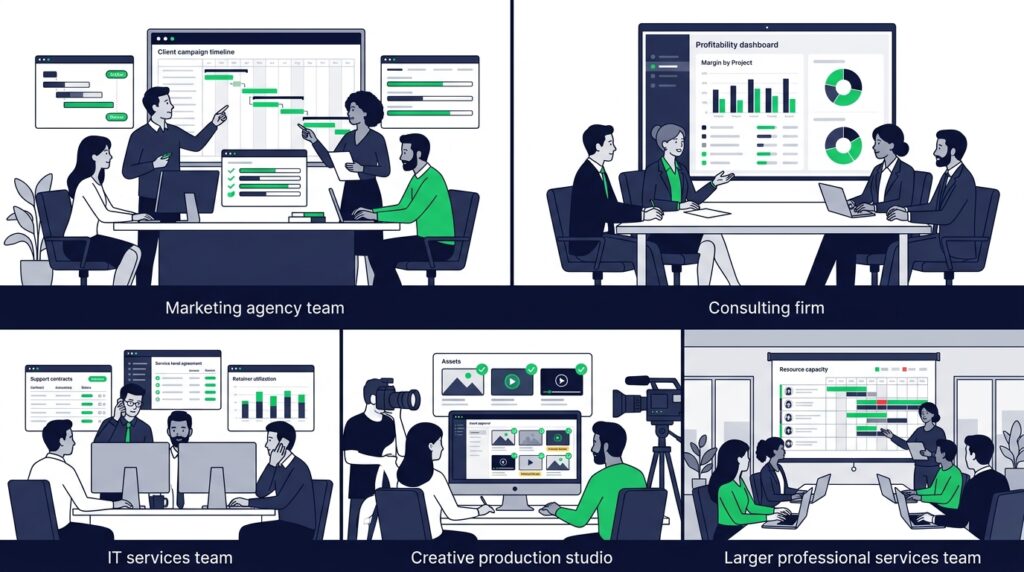
Teamwork.com earns its price for teams that bill clients by the hour, manage retainers, and need to know whether each engagement is profitable.
Here’s where it genuinely fits:
| Team type | Why Teamwork.com fits |
| Marketing agencies | Multi-client project management, billable time tracking per client, retainer budget consumption, and QuickBooks invoicing from tracked hours — the full agency billing cycle in one platform |
| Consulting firms | Retainer tracking, client project visibility, and profitability reporting on Optimize give consultancies the financial visibility that spreadsheet-based tracking can’t reliably deliver |
| Creative production companies | Time tracking against deliverables, client review and approval visibility, and budget burn rate against scoped hours — core to any creative studio billing by the hour |
| IT services businesses | Billable vs. non-billable time separation, retainer management for support contracts, and the client portal for ticket and project status visibility without exposing internal tooling |
| Professional services at 5–100 seats | Large enough to need structured client billing; small enough that Teamwork.com’s pricing model works before it requires a full PSA platform investment |
Where it doesn’t fit: internal teams with no client billing, solo users, or small teams whose needs the Free plan covers but who want retainer management without paying for 5 minimum seats on Accelerate.
Teamwork.com Features: An In-Depth Look
Task and project management
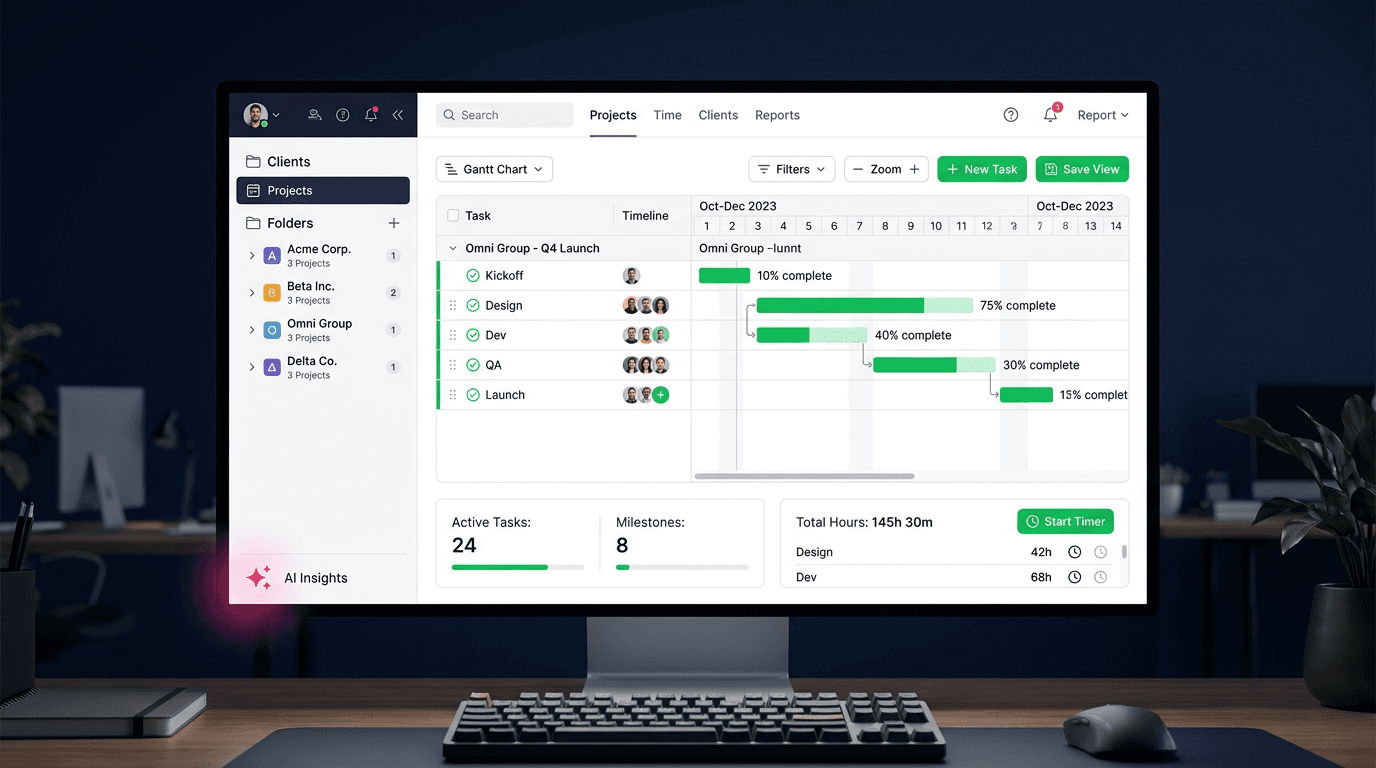
Teamwork.com covers the standard view range — List, Board, Gantt, Table, and Calendar — and all of them work reliably.
The Gantt chart includes dependency tracking and milestone management, which makes it functional for multi-phase client projects.
It’s not as visually polished as Asana’s Timeline, and it doesn’t have the configuration depth of Wrike’s Gantt, but it does the job cleanly for most agency project structures.
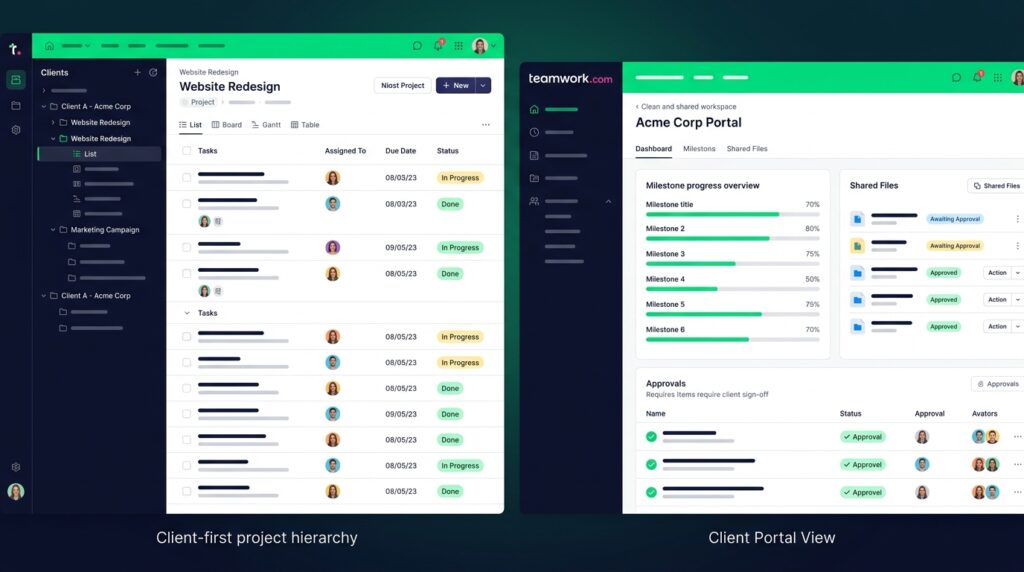
The key contextual difference from every other tool in this cluster: every project view in Teamwork.com is organised around clients first. Work is structured by client, then project, then task.
For an agency juggling eight clients simultaneously, that’s a real daily efficiency gain.
Native time tracking
This is one of Teamwork.com’s primary differentiators — and it’s available on every paid plan including the free tier.
The time tracking implementation covers the full agency billing workflow: one-click timers per task, manual time entry, billable vs. non-billable hours, and rate cards configurable per project or per client.
You can set a different hourly rate for each client, and the tracked time feeds directly into budget and retainer calculations.
Compare this to Asana, which has no native timer at all on Starter and only estimate vs. actual tracking on Advanced, or ClickUp, where the time tracking UX requires multiple clicks and has no payroll or accounting export.
Teamwork.com’s time tracking is purpose-built, not an afterthought.
For an agency where time is the product, this matters more than any other feature on the list.
Client portal
No other tool reviewed in this cluster has a native client portal. Not ClickUp. Not Asana. Not Monday.com. Not Wrike.
Teamwork.com’s client portal gives clients a dedicated login where they can see project progress, milestones, shared files, and status updates — without seeing your internal notes, pricing, team communications, or task-level detail you don’t want shared.
Here’s the concrete use case: a marketing agency running a six-month brand campaign for a client.
Instead of sending weekly status email updates or building a custom client dashboard in a separate tool, the client logs into Teamwork.com and sees exactly what you’ve chosen to share — milestone progress, upcoming deliverables, approved files.
They feel informed.
You control the narrative.
The relationship overhead drops significantly.
Basic client project sharing is available from the Basics plan, with fuller client portal and status-sharing features building through Accelerate and above.
No other tool in this cluster has this — it’s Teamwork.com’s single most distinctive capability for agency users.
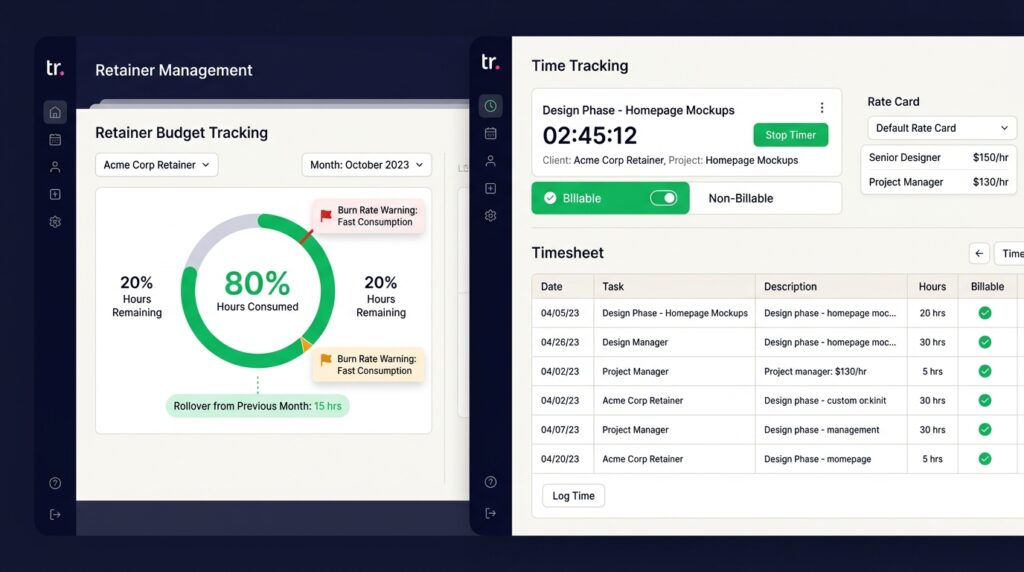
Retainer management
Retainer management is on the Accelerate plan ($24.99/user/mo annual, 5-user minimum).
This covers tracking recurring client retainers, budget consumption month-over-month, rollover hours, and time-vs-budget burn rate in real time.
Every other tool in this cluster — ClickUp, Asana, Monday.com, Wrike — lacks this feature entirely.
The practical value: a 20-hour monthly retainer with a client.
As your team logs time, Teamwork.com shows how many hours are consumed, how many remain, and whether you’re tracking to run over.
When you hit 80% consumption, you can slow down, scope additional work, or have a proactive client conversation.
Without this, most agencies track retainer burn in a spreadsheet alongside their PM tool — always one update behind.
Profitability reporting
Profitability reporting — revenue by project, cost by project, margin, and AI-powered profitability forecasting — is on the Optimize plan, which requires a custom quote from sales.
This is the most important pricing nuance in this article, and it’s absent from almost every competing review.
What that means practically: P&L by project — actual hours logged at your blended rate, minus costs, compared to what you billed — requires Optimize.
Accelerate gives you retainer tracking and time budgets. Optimize gives you the full margin view.
For agencies where profitability reporting changes commercial decisions, Optimize’s custom pricing likely makes sense.
For smaller agencies still building toward that scale, Accelerate’s retainer tracking is the accessible entry point.
QuickBooks integration
The QuickBooks integration on Accelerate auto-syncs time log data from Teamwork.com directly into QuickBooks — tracked hours feed invoice generation without manual export and re-entry.
Time is logged against client tasks throughout the month, the sync runs automatically, and the invoice is generated from accurate, already-synced data at billing time.
No spreadsheet intermediary, no manual reconciliation.
For agencies invoicing multiple clients monthly, this saves several hours of admin per billing cycle — and it’s the reason the integration shows up consistently in Capterra reviews as a primary factor in choosing Teamwork.com.
Automations
The automation builder covers the standard trigger-and-action model: 100 automations/month on free, 5,000 on Basics, 20,000 on Accelerate, 100,000 on Optimize.
The agency-relevant automations — auto-assigning tasks when a phase starts, notifying the account manager when a milestone completes, moving tasks to review when time is logged — work cleanly without code.
It’s not ClickUp’s automation depth, and it doesn’t need to be.
The trigger library is designed around client project handoffs, not general-purpose workflow automation.
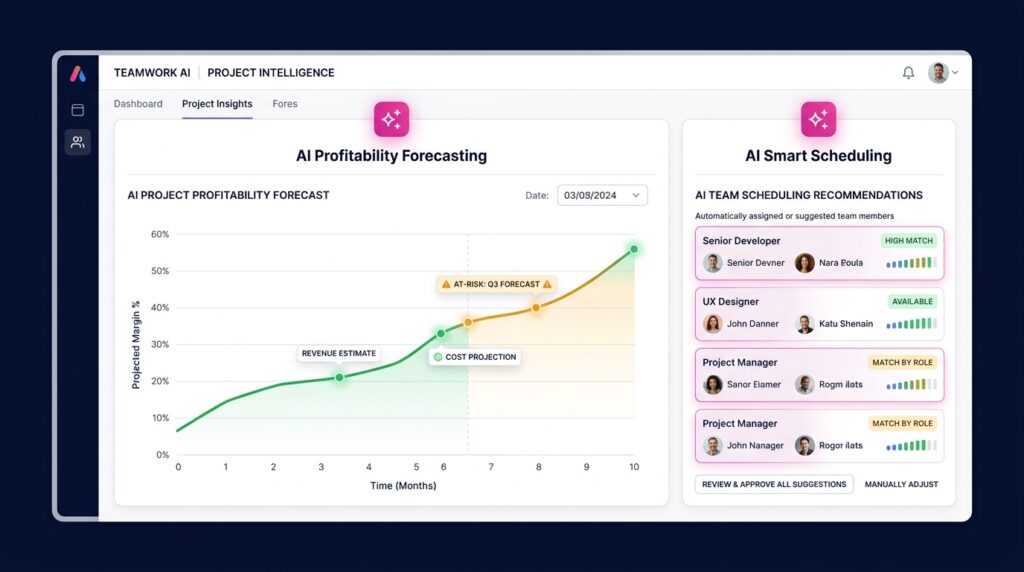
TeamworkAI
TeamworkAI is available across all plans, including the free tier.
It covers comment summarisation, task summaries, and AI-assisted capacity and utilization insights on Accelerate and above.
The risk flagging and profitability forecasting features are on Optimize.
Honest assessment: for small agencies on Basics or Accelerate, the AI layer adds useful productivity features — catching up on a long comment thread before a client call, summarising project status for a weekly report — without being transformative.
At Optimize scale, the AI profitability forecasting is where the real value emerges.
It’s a well-integrated feature set, not an AI rebrand of existing functionality.
Integrations
150+ integrations covers the standard agency stack: Slack, Google Drive, Microsoft Teams, HubSpot (Accelerate+), Salesforce and NetSuite (Optimize+), Xero, and QuickBooks (Accelerate+).
The accounting integrations are the ones that matter most for agency billing workflows.
Worth noting for creative agencies: Teamwork.com’s Proofs feature handles file review and approval natively — not as deep as Wrike’s built-in proofing, but enough to cover client asset review without adding another subscription.
Navigation and performance
Teamwork.com’s interface is dense — the most-cited weakness in real user reviews on both G2 and Capterra.
The client-first hierarchy that makes it powerful for agency work also means there are more layers to navigate than in Asana or Monday.com.
New users consistently report a steeper learning curve than expected, and the onboarding investment is real.
Performance can also slow on large projects with many tasks and dependencies — this shows up in Capterra reviews specifically for agencies with large accumulated project histories.
If you’re migrating a high volume of historical project data onto the platform, test performance under that load before committing.
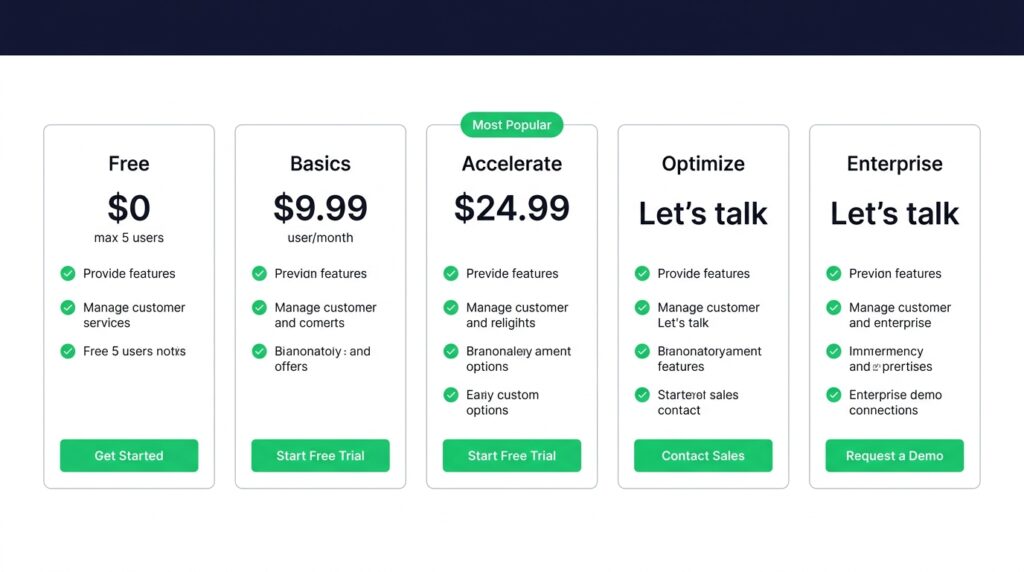
Teamwork.com Pricing
| Plan | Annual | Monthly | Key Details |
| Free | $0 | $0 | Max 5 users; 5 projects; time tracking; Gantt; 100 automations/month |
| Basics | $9.99/user/mo | Higher | Min 3 users; 300 projects; 5,000 automations; basic QuickBooks sync; client project sharing |
| Accelerate | $24.99/user/mo | Higher | Min 5 users; retainer management; time budgets; advanced QuickBooks; HubSpot; 20,000 automations |
| Optimize | Custom | Custom | Profitability reporting; revenue and cost insights; AI profitability forecasting; Salesforce + NetSuite; 100,000 automations |
| Enterprise | Custom | Custom | SSO (paid add-on); dedicated success manager; priority support; custom infrastructure |
| ⚠️ The agency features you actually need aren’t on the entry planThe features that make Teamwork.com genuinely useful for agency workflows are tiered across two paid plans. Retainer management and advanced QuickBooks sync require Accelerate ($24.99/user/mo annual, 5-user minimum — $124.95/month minimum). Profitability reporting — actual revenue, cost, and margin by project — requires Optimize, which is custom-priced and requires a sales conversation. The Basics plan ($9.99/user/mo) includes time tracking and client project sharing, but if retainer management or profitability visibility is why you’re evaluating Teamwork.com, budget for Accelerate minimum. |
| ⚠️ SSO is not included in any standard planSingle Sign-On requires the Enterprise plan, which is custom-priced. SSO is listed as a paid add-on and is not bundled into Basics, Accelerate, or Optimize. If your organisation has IT governance requirements around SSO — common in mid-size and enterprise environments — factor this into your total cost calculation before committing to a standard plan. |
The free plan is genuine — 5 users, 5 projects, time tracking, Gantt, and 100 automations/month at no cost.
For a small agency testing the platform before committing, it’s enough to evaluate the core workflow.
All paid plans include a 30-day free trial, no credit card required.
I’ve covered the full plan structure and cost comparisons in more detail in my detailed Teamwork.com pricing breakdown.
Teamwork.com Pros and Cons
| ✅ Pros | ❌ Cons |
| Native client portal — the only tool in this category with a dedicated client-facing project view built in | Profitability reporting (revenue, cost, margin by project) requires Optimize — custom pricing, contact sales |
| Billable time tracking with rate cards per project and per client — purpose-built for agency billing workflows | Interface complexity is the most-cited weakness in real user reviews — navigation can feel dense, especially for new users |
| Retainer management with rollover tracking built into Accelerate — absent from every other tool in this cluster | Performance can slow on large projects with many tasks and dependencies — flagged on both G2 and Capterra |
| QuickBooks integration (Accelerate) auto-syncs time logs to invoices — a real billing workflow, not just a data connection | SSO is a paid add-on (Enterprise) — not included in any standard plan tier; a dealbreaker for IT-governed orgs |
| Free plan includes time tracking and Gantt — features locked behind paid tiers in Asana and ClickUp | Accelerate minimum is 5 users — a 3-person agency can’t access retainer management without paying for 2 unused seats |
| Founded 2007 — mature, stable platform with 20,000+ companies and strong G2/Capterra/Trustpilot ratings | Not a generalist tool — teams without client billing needs will pay for features they don’t use |
| 30-day free trial on all paid plans — meaningful evaluative runway to test retainer and billing features | Reporting depth below Optimize is limited — advanced financial and profitability views require custom pricing |
How Does Teamwork.com Compare to Alternatives?
| Teamwork.com | Asana | ClickUp | Monday.com | |
| Free plan | Yes — 5 users, 5 projects | Yes — 2 users | Yes — unlimited members | No team free plan |
| Starting price (annual) | $9.99/user/mo | $10.99/user/mo | $7/user/mo | $9/seat/mo |
| Best for | Agency / client work | Structured team workflows | Feature-rich all-in-one | Visual workflows |
| Native client portal | Yes — Basics+ | No | No | No |
| Billable time tracking | Yes — all paid plans | Advanced+ only | Unlimited+ (basic) | Yes (Pro+) |
| Retainer management | Yes — Accelerate+ | No | No | No |
| Profitability reporting | Yes — Optimize (custom) | No | No | No |
| QuickBooks integration | Yes — Accelerate+ | No | Yes (via Zapier) | Yes (via Zapier) |
| Learning curve | Medium-high | Low–medium | High | Low–medium |
The table makes the differentiation clear: Teamwork.com is the only tool here with a native client portal, retainer management, and profitability reporting.
If you don’t bill clients by the hour, ClickUp and Monday.com deliver more per dollar for internal team management.
For deeper tool-specific comparisons: my ClickUp review, Asana review, and Wrike review each cover those tools in full.
Who Should NOT Use Teamwork.com?
Teamwork.com’s client-work specialisation is a strength for the right buyer and a cost overhead for the wrong one. Skip it if:
- You don’t bill clients — If your team is internal-only with no client billing, retainer management, or profitability tracking needs, you’re paying for features you’ll never use. ClickUp or Asana deliver better general-purpose task management at lower cost.
- You’re a solo user or a team under 3 — The Basics plan has a 3-user minimum; Accelerate requires 5. A solo freelancer or a 2-person studio can use the free plan but will hit a ceiling fast. The seat minimums mean you’re subsidising unused licenses to access the features you actually need.
- You need fast onboarding — The interface density and client-hierarchy structure require real setup investment. Teams that need a tool running smoothly within a week will find Asana or Monday.com significantly faster to onboard.
- You need profitability reporting now and can’t go custom — If P&L visibility by project is a current requirement and Optimize’s custom pricing is out of budget, you’ll need a different tool or a supplementary financial reporting layer. Profitability reporting is not available at any published price point — it requires a sales conversation.
- You have SSO requirements on a fixed budget — SSO is Enterprise-only at custom pricing. If SSO is an IT requirement and Enterprise pricing doesn’t work, evaluate alternatives with lower-tier SSO access.

Final Verdict: Is Teamwork.com Worth It?
Teamwork.com is worth it for agencies and professional services firms managing client projects with billable hours.
The client portal, retainer management, billable time tracking, and QuickBooks billing integration are category-leading for this specific use case — no other tool in this cluster comes close on the agency billing workflow.
The pricing model requires careful planning: the features that matter most for agencies start at Accelerate ($24.99/user/mo, 5-user minimum), and full profitability reporting requires Optimize at custom pricing.
For internal teams, generalist PM tools deliver more per dollar.
My verdict by team type:
- Marketing agencies and client services firms: Strong yes — the client portal, retainer tracking, and QuickBooks sync are purpose-built for this workflow. Evaluate on the Accelerate plan minimum.
- Consulting and IT services at 10+ seats: Yes — particularly if profitability reporting at Optimize tier is within budget. The financial visibility at that tier is genuinely differentiated.
- Small agencies under 5 people: Conditional — the free plan is a real evaluation option. The Accelerate minimum of 5 seats means budgeting for unused seats to access retainer management.
- Internal teams with no client billing: No. ClickUp, Asana, or Monday.com will serve you better at lower cost.
Start with the free plan — 5 users, 5 projects, time tracking included, no credit card required. Try Teamwork.com free.
Frequently Asked Questions
Is Teamwork.com worth it?
Teamwork.com is worth it for agencies and professional services firms managing client projects with billable hours.
The client portal, retainer management, and QuickBooks integration are category-leading for this use case.
For internal teams with no client billing, generalist tools like ClickUp or Asana deliver more per dollar without the agency-specific overhead.
Is Teamwork.com legit?
Yes. Teamwork.com was founded in 2007 in Cork, Ireland and is used by 20,000+ companies worldwide.
G2 rates it 4.4/5 from 1,100+ reviews.
Trustpilot and Capterra both show high satisfaction scores, particularly among agency and professional services users.
It’s a mature, stable platform — not a new entrant with unproven reliability.
Does Teamwork.com have a free plan?
Yes — the free plan supports up to 5 users and 5 projects.
It includes time tracking, Gantt charts, and 100 automations per month — features that are locked behind paid tiers in Asana and ClickUp.
Paid plans start at $9.99/user/mo (Basics, annual).
Retainer management requires Accelerate ($24.99/user/mo); profitability reporting requires Optimize at custom pricing.
How does Teamwork.com compare to Asana?
Teamwork.com is built for client work — native client portal, billable time tracking with rate cards, retainer management, and QuickBooks invoicing.
Asana is better for internal team collaboration with a cleaner interface and faster onboarding, but has no native client portal, no retainer management, and no billing integration.
If you bill clients by the hour, Teamwork.com wins on workflow fit.
If you manage internal projects, Asana’s simplicity wins. See my full Asana review for the full comparison.
Is Teamwork.com good for agencies?
Yes — it’s one of the strongest tools in the market for agency use.
The native client portal, billable time tracking with configurable rate cards, retainer budget tracking, and QuickBooks integration are purpose-built for agency billing workflows.
No other project management tool in this category combines all four natively.
The Accelerate plan ($24.99/user/mo, 5-user minimum) is the practical entry point for most agency workflows.
Sources
Teamwork.com pricing page (verified May 26, 2026)
G2 — Teamwork.com reviews (4.4/5, 1,100+ reviews)Capterra — Teamwork.com reviews

Recent Posts
Monday.com Review 2026: Is It Still the Best Work OS?
I tested Monday.com against ClickUp, Asana, and Wr...
Updated July 27, 2026

AI Writing Software for Blogging in 2026: Best Tools + How to Stay AI-Search Vis...
The best AI writing software for blogging in 2026 ...
Updated July 20, 2026
HubSpot Review 2026: Is It Worth the Cost?
I tested HubSpot’s free CRM, Starter, and Pr...
Updated July 20, 2026
Teamwork.com Review 2026: Is It the Best PM Tool for Client Work?
I tested Teamwork.com for agency and client projec...
Updated May 29, 2026
Wrike Review 2026: Is It Worth the Cost?
I tested Wrike in real enterprise workflows. Here&...
Updated May 29, 2026
Asana Review 2026: Is It Worth It? (Honest, In-Depth Analysis)
I tested Asana across real team workflows. Here...
Updated May 29, 2026
Newsletter
Don't miss a thing!
Sign up to receive daily news