
Updated May 29, 2026
HubSpot Review 2026: Is It Worth the Cost?
Table of Contents
HubSpot Review: Quick Verdict
| HubSpot Review: Quick Verdict Overall rating: 4.3 / 5 Starting price: Free CRM (up to 5 users); Starter from $15/seat/mo (annual); Professional from $890/mo (Marketing Hub, annual) Best for: Growth-stage B2B companies that need a unified CRM, marketing automation, and sales platform — and are ready to invest in Professional tier Skip if: You’re a bootstrapped startup, a single-hub user, or a team that needs simple CRM at low cost — cheaper tools do specific jobs better at lower price points Free plan: Yes — free CRM forever, up to 5 users. Genuinely capable. More useful than most free CRMs. |
HubSpot’s free CRM is one of the best in the market. HubSpot’s Professional tier pricing will make you do a double-take.
That tension — between a genuinely excellent entry point and a steep paid-tier bridge — is exactly what this HubSpot review is here to help you navigate.
The pricing complexity alone is enough to confuse most buyers: seats, credits, hub tiers, mandatory onboarding fees, and a Core Seat pricing trap that can quietly double your bill.
I’ll break all of it down.
HubSpot is a CRM and marketing automation platform — not a project management tool.
If that’s the category you’re evaluating, my Monday.com review is a better starting point.
If you’re comparing HubSpot across the broader SaaS stack, I’ve covered how it fits into the wider marketing and project management software landscape.
What Is HubSpot?
HubSpot was founded in 2006 by Brian Halligan and Dharmesh Shah at MIT.
They coined the term ‘inbound marketing’ — the idea that you earn customers by creating content they want to find, rather than interrupting them with ads.
That’s still the product’s DNA: the free CRM hooks you, the content and marketing tools help you grow, and the platform expands as your team does.
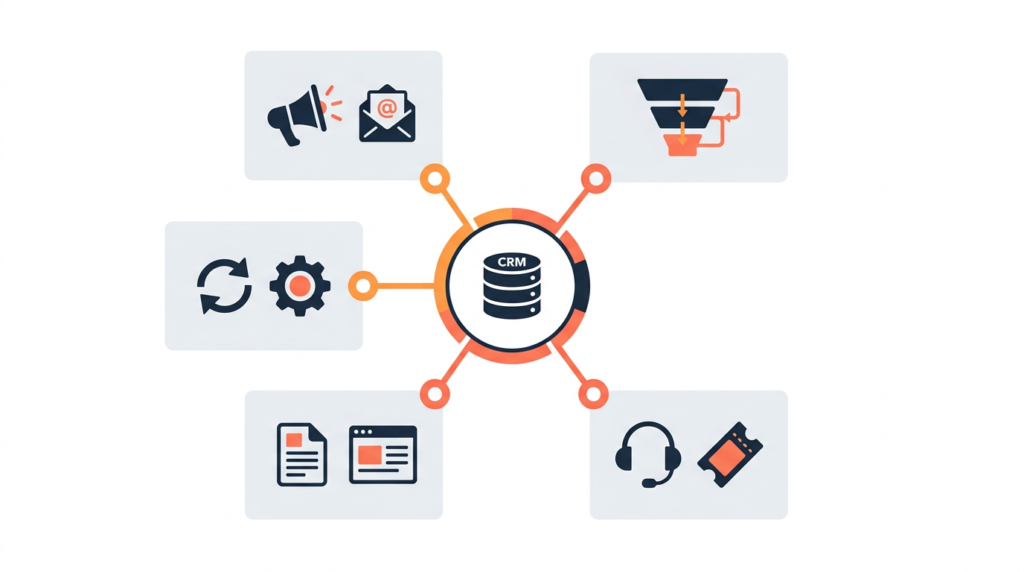
The platform organises around five product hubs — Marketing, Sales, Service, Content, and Operations — plus a Smart CRM that ties them together.
You can buy individual hubs or bundle them into the Customer Platform. G2 rates HubSpot 4.4/5 from 14,500+ reviews — the largest review base in the CRM category.
Trustpilot reviews are more mixed, with pricing complexity and support responsiveness as the recurring complaints.
Who Is HubSpot Best For?
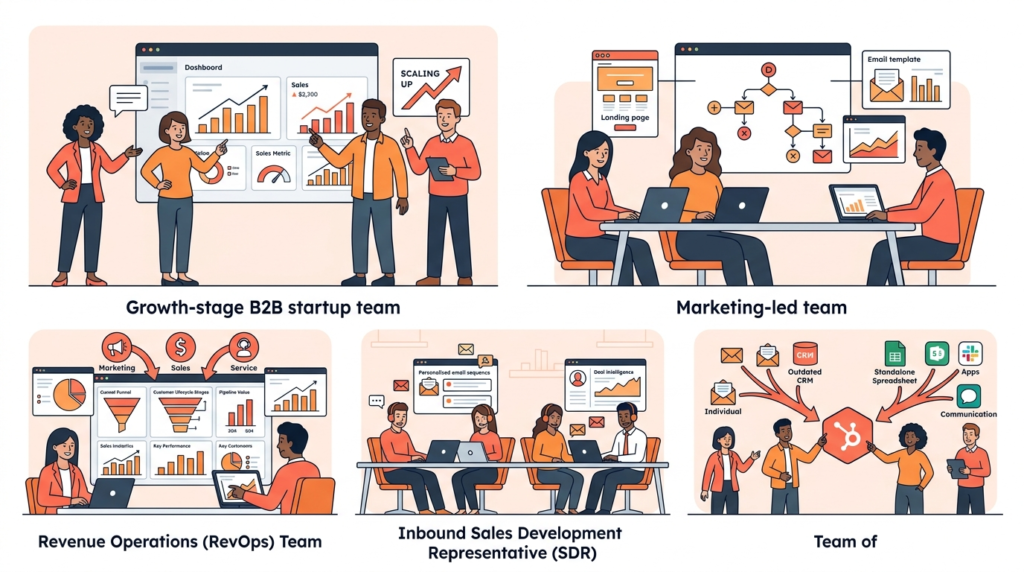
HubSpot earns its price tag for teams that need marketing, sales, and service data unified in one platform — and are ready to invest in Professional tier to access the features that make it genuinely powerful.
| Team type | Why HubSpot fits |
| Growth-stage B2B companies | Teams scaling from early-stage to 50–500 employees who need marketing automation, CRM, and sales tooling to grow together — without the complexity of Salesforce or the fragmentation of separate tools |
| Marketing-led businesses | Companies where the marketing team drives pipeline — HubSpot’s marketing automation, landing pages, forms, ad management, and email tools are deeply integrated with CRM data in a way that standalone tools can’t replicate |
| RevOps teams | Revenue operations leads who need a single source of truth for marketing, sales, and service data — HubSpot’s unified platform eliminates the reconciliation overhead of syncing separate tools |
| Inbound-focused sales teams | SDR and AE teams using sequences, playbooks, and deal intelligence — Sales Hub’s AI features and Breeze prospecting work best when marketing and CRM data are in the same platform |
| Companies replacing point solutions | Businesses currently running separate CRM, email marketing, service desk, and analytics tools — HubSpot’s bundle pricing can deliver total cost savings when replacing 3+ separate subscriptions |
Where it doesn’t fit: bootstrapped startups that need simple CRM without automation overhead, single-hub users who can find cheaper standalone tools, and teams that need rapid deployment with minimal configuration.
HubSpot Features: An In-Depth Look
Smart CRM — the free foundation
The free CRM is where most HubSpot relationships start, and it’s worth being specific about why it’s worth starting there.
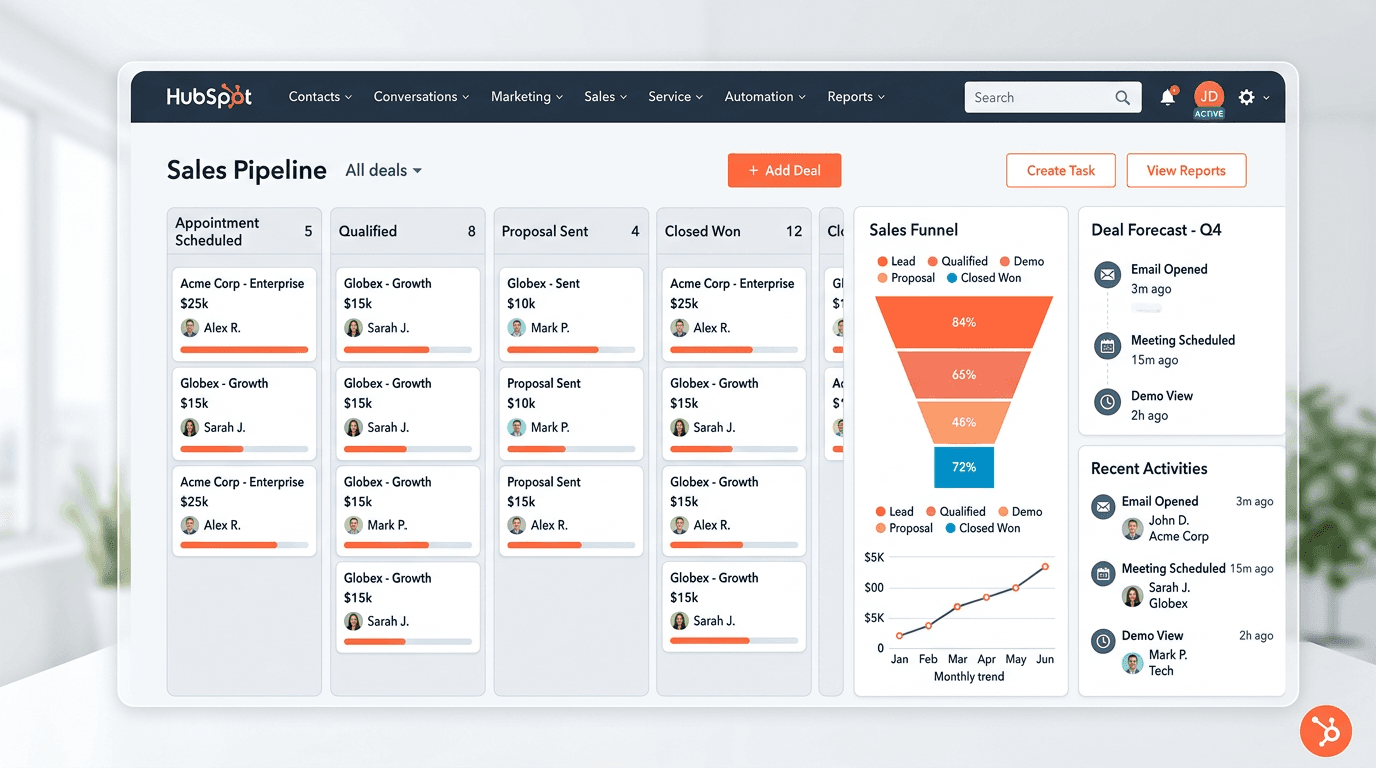
Contact management, company records, deal pipelines, meeting scheduling, email tracking, and basic reporting are all included at no cost for up to 5 users.
That’s not a stripped-down trial — it’s a functional CRM that small teams can genuinely run their sales process on.
The catch: ‘free’ means free CRM infrastructure with limited tools across each hub.
The moment you need automation, A/B testing, custom reporting, or advanced sequences, you’re on a paid tier — and that’s where the pricing conversation gets complicated.
Marketing Hub
Marketing Hub covers email marketing, landing pages, forms, ad management, and marketing automation.
The Starter tier ($15/seat/mo annual) gives you basic automation and removes HubSpot branding — functional for small teams sending regular campaigns.
The Professional tier is where it becomes a serious marketing platform: full workflow automation, A/B testing, dynamic content, custom reporting, campaign attribution, and social media management.
The honest context: if you need advanced marketing automation, Marketing Hub Professional at $890/mo is competitive against ActiveCampaign or Marketo at equivalent capability.
If you only need basic email marketing, it’s overpriced.
The feature gap between Starter and Professional is enormous — A/B testing, advanced workflows, and custom reporting are all Professional-only.
That’s the cliff that catches most buyers by surprise.
Sales Hub
Sales Hub covers deal pipelines, email sequences, meeting scheduling, playbooks, forecasting, and CPQ (Configure, Price, Quote).
Professional tier adds predictive lead scoring, custom forecasting, and the Breeze Prospecting Agent.
The per-seat model makes Sales Hub more predictable to budget than Marketing Hub — Sales Hub Professional is $100/seat/mo with a $1,500 mandatory onboarding fee.
For inbound-focused sales teams already using HubSpot marketing, Sales Hub’s integration with CRM contact data is the primary value driver — deal intelligence, sequence enrolment from marketing engagement, and unified contact history without custom syncing.
For teams running a separate CRM, that integration benefit disappears and Pipedrive becomes a stronger cost argument.
Service Hub
Service Hub covers ticketing, help desk, knowledge base, customer portal, and SLA management.
For B2B companies managing post-sale customer relationships within the same platform as CRM and marketing data, it closes the full customer lifecycle loop.
Most teams evaluating HubSpot for the first time will assess Service Hub secondarily — it works well at Professional tier for companies already on HubSpot and is priced competitively against Zendesk for teams that don’t need Zendesk’s enterprise depth.
Content Hub
Content Hub (formerly CMS Hub) is HubSpot’s website builder, blogging platform, and SEO recommendation engine.
It differentiates HubSpot from pure-play CRMs — building and managing your marketing website within the same platform as your CRM means every visitor interaction and form fill feeds directly into contact records without integration overhead.
For marketing-led B2B teams managing content at volume, that closed loop is real efficiency.
For teams with an existing website they’re not moving, Content Hub is largely irrelevant.
Operations Hub
Operations Hub handles two-way data sync with third-party tools, data quality automation (deduplication, formatting, normalisation), and programmable automation for custom logic the standard workflow builder can’t handle.
For RevOps teams responsible for CRM data integrity, it’s a meaningful investment.
For a growth-stage B2B evaluating HubSpot for the first time, it’s a later-stage consideration.
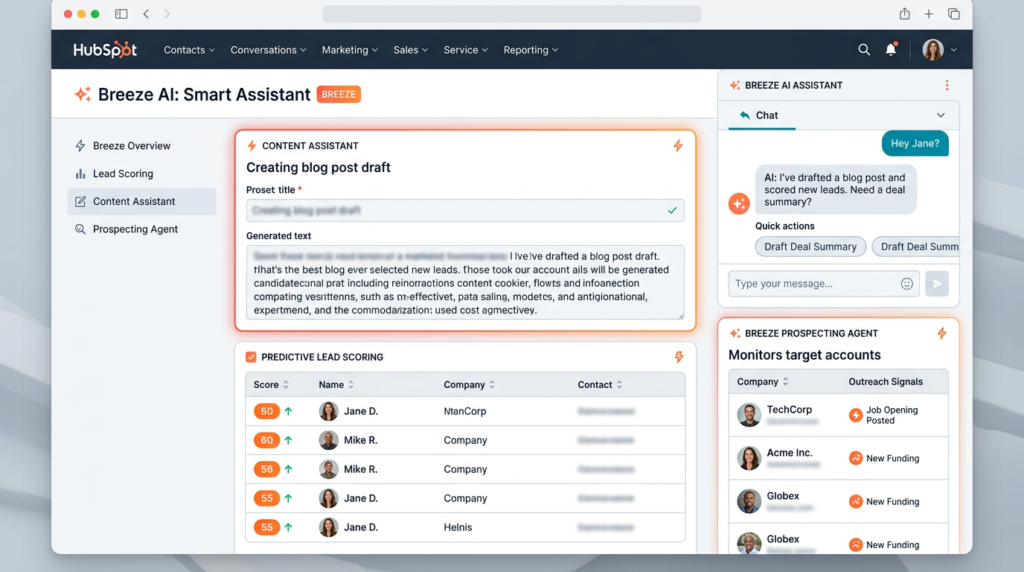
Breeze AI
Breeze is HubSpot’s AI layer, introduced in 2024 across all hubs.
It covers content generation, email personalisation, deal summaries, predictive contact scoring, chatbot automation, and the Breeze Prospecting Agent (which monitors target accounts and surfaces outreach signals for SDRs).
The honest assessment: Breeze is genuinely integrated throughout the platform rather than a superficial AI rebrand — AI features appear where they’re useful in the workflow rather than as a separate module you have to navigate to.
The tier reality: most advanced Breeze features require Professional+.
The Breeze Prospecting Agent on Sales Hub Professional consumes 100 credits per monitored contact per month — with 3,000 monthly credits on Professional, that covers roughly 30 monitored contacts.
Teams with larger prospecting lists will exhaust credits quickly.
Credits don’t roll over, and additional credits at $10 per 1,000 are worth modelling before committing.
Integrations
1,500+ native integrations includes Salesforce (two-way sync), Slack, Google Workspace, Shopify, Zoom, LinkedIn, and Microsoft Teams.
The App Marketplace is one of the strongest in the CRM category — integration depth and maintenance quality are consistently cited as reasons companies stay on HubSpot.
HubSpot’s native integrations are generally deeper than Zapier-dependent connections in cheaper tools.
The Salesforce two-way, real-time sync specifically is something RevOps teams running both platforms rely on heavily.
Reporting and analytics
Custom dashboards, revenue attribution, funnel reporting, and campaign ROI tracking are available at Professional and above.
Starter reporting is functional but limited — pre-built dashboards, basic metrics, no custom report building or multi-touch attribution.
For a marketing team that needs to prove campaign ROI to leadership, Starter’s reporting ceiling is real.
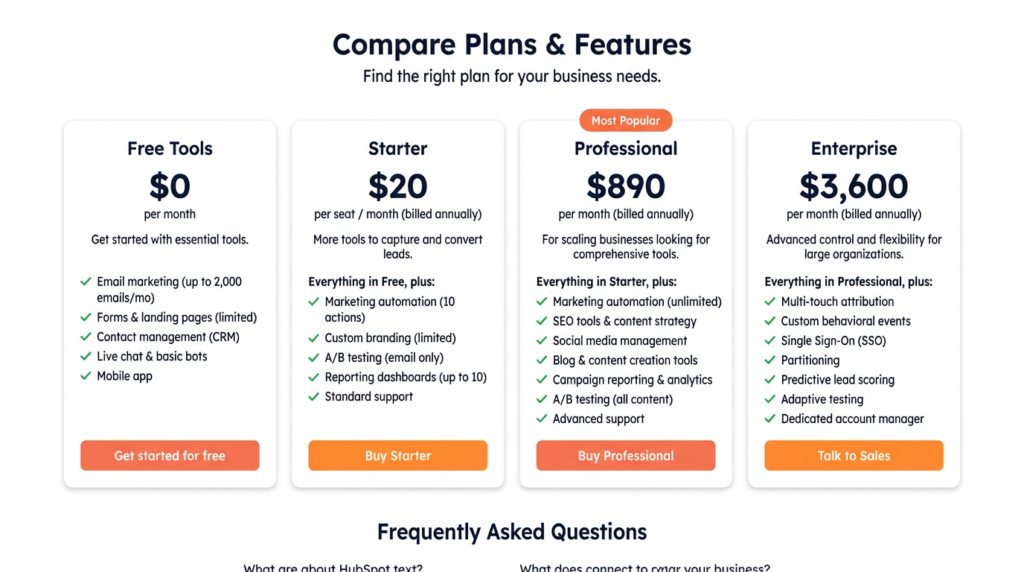
HubSpot Pricing — The Full Picture
| Plan | Annual | Monthly | Key Details |
| Free | $0 | $0 | Up to 5 users; contact management, deal tracking, meeting scheduling; limited tools across all hubs |
| Starter | $15/seat/mo (annual) | $20/seat/mo | 500 credits/mo; essential tools across all hubs; removes HubSpot branding; 1 Core Seat minimum |
| Professional | From $890/mo (Marketing Hub, 3 seats, annual) | From $1,080/mo | 3,000 credits/mo; full automation, A/B testing, custom reporting, AI workflows; mandatory onboarding fee |
| Enterprise | From $3,600/mo (Marketing Hub, 5 seats) | Annual only | 5,000 credits/mo; custom objects, predictive scoring, advanced permissions; mandatory onboarding fee |
| ⚠️ The Starter-to-Professional cliff: 44x for Marketing HubMarketing Hub Starter starts at $20/seat/mo. Marketing Hub Professional starts at $890/mo (3 seats, 2,000 contacts, annual billing). That’s a 44x price increase — and the features most professional marketing teams actually need (advanced automation, A/B testing, custom reporting, AI workflows) are all behind Professional. This is the most common pricing surprise reported in HubSpot user reviews. If you’re evaluating HubSpot for anything beyond basic email campaigns, you’re evaluating Professional — budget for it from the start. |
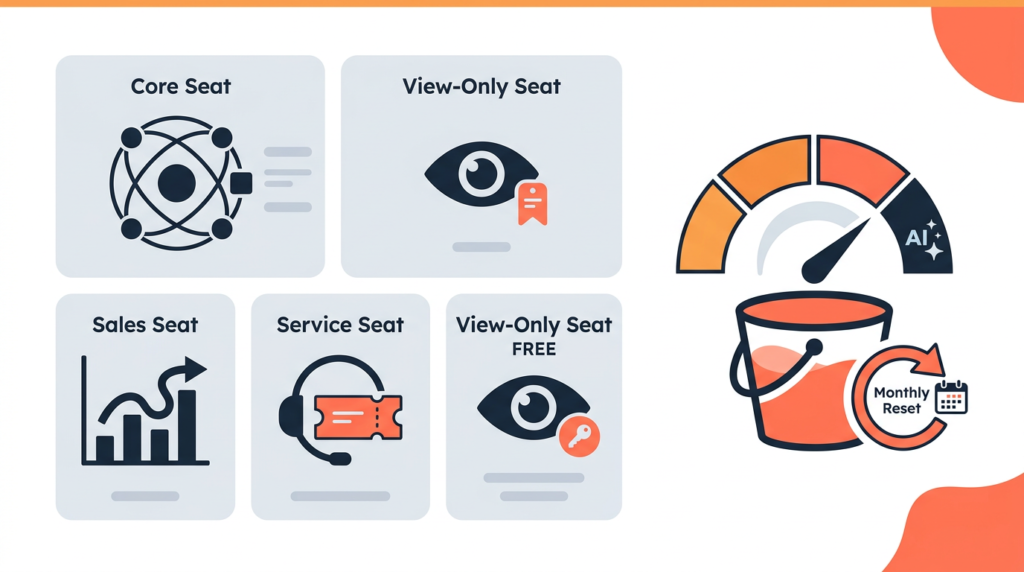
The seats + credits model — explained plainly
The March 2024 pricing overhaul introduced two billing units that are widely misunderstood. Here’s what they actually mean:
| Unit | What It Means |
| Core Seats | Full platform access across all hubs. Priced at the highest hub tier you own — if you have Marketing Hub Professional and Sales Hub Enterprise, every Core Seat is billed at Enterprise rates. This is the Core Seat pricing trap. |
| Sales Seats | Role-specific access to Sales Hub features: sequences, forecasting, CPQ. Priced separately from Core Seats. Sales Hub Professional: $100/seat/mo. |
| Service Seats | Role-specific access to Service Hub features: ticketing, SLA management, help desk. Service Hub Professional: $90/seat/mo. |
| View-Only Seats | Free and unlimited on any paid portal. Stakeholders can view dashboards, reports, and records without editing or incurring seat costs. A genuine cost saver for leadership visibility. |
| HubSpot Credits | Monthly-reset usage bucket for Breeze AI features. Starter: 500/mo. Professional: 3,000/mo. Enterprise: 5,000/mo. Credits do not roll over. Exhausting your credit allocation before month-end either pauses AI features or triggers overage charges. |
The Core Seat pricing trap: if you own multiple hubs at different tiers, all Core Seats are priced at the highest tier you own.
Marketing Hub Professional + Sales Hub Enterprise = every Core Seat at Enterprise rates.
This catches multi-hub buyers off guard at renewal. Plan your hub tiers deliberately.
| ⚠️ Mandatory onboarding fees — not optional, not refundableProfessional and Enterprise plans require mandatory one-time onboarding fees. These are charged regardless of whether you use the onboarding services. |
| Hub / Plan | Onboarding Fee | Notes |
| Marketing Hub Professional | $3,000 | Mandatory, one-time, non-refundable |
| Marketing Hub Enterprise | $7,000 | Mandatory, one-time, non-refundable |
| Sales Hub Professional | $1,500 | Mandatory, one-time |
| Sales Hub Enterprise | $3,500 | Mandatory, one-time |
| Service Hub Professional | $1,500 | Mandatory, one-time |
| CRM Suite / Customer Platform Pro | ~$4,500 | Verify with HubSpot — bundled rate |
These fees show up consistently as the top pricing complaint in HubSpot user reviews — not because they’re unreasonable for what’s included, but because they’re frequently not surfaced clearly during the sales process.
Factor them into Year 1 budget calculations from day one.
| 💡 Most companies negotiate 20–35% off list priceHubSpot list prices are not fixed. Multiple independent pricing sources confirm that 20–35% discounts are common at Professional and Enterprise tiers — particularly with annual commitments, multi-hub bundles, or volume seat purchases. Never accept the first number your HubSpot rep gives you. The onboarding fee is also negotiable in some cases, particularly through certified HubSpot Solutions Partners who can apply onboarding budget toward their own implementation services. |
For a full breakdown of every hub and tier, see HubSpot’s pricing page directly.
If your organisation is a nonprofit, HubSpot offers a 40% discount on Professional and Enterprise plans (North America, Australia, and New Zealand only, new customers only) — I’ve covered the details in my HubSpot for nonprofits guide.
HubSpot Pros and Cons
| ✅ Pros | ❌ Cons |
| Free CRM is genuinely best-in-class — contact management, deal pipelines, meeting scheduling, and email tracking at zero cost | The Starter-to-Professional cliff is steep: Marketing Hub jumps from $20/seat/mo to $890/mo (44x) — most professional features are locked behind Professional |
| 1,500+ native integrations — one of the deepest app marketplaces in the CRM category | Mandatory onboarding fees: $3,000 (Marketing Hub Professional), $7,000 (Marketing Hub Enterprise) — non-optional, non-refundable |
| All hubs in one platform — marketing, sales, service, content, and operations data unified without custom integration work | Core Seat pricing trap: if you mix hub tiers, all Core Seats are priced at your highest tier — costs escalate quickly as you add hubs |
| Breeze AI is integrated throughout the platform, not bolted on — content generation, predictive scoring, deal summaries all work within your existing workflows | Marketing Hub pricing adds a contact-based cost layer on top of seats — overage charges apply when you exceed your marketing contact limit |
| G2 4.4/5 from 14,500+ reviews — the largest review base in the category reflects genuine user satisfaction at scale | HubSpot Credits don’t roll over — unused AI credits expire monthly, and exhausting them can block AI features mid-month |
| View-Only Seats are free — leadership and stakeholders get full dashboard visibility without adding to your seat bill | Trustpilot reviews are more mixed than G2 — pricing complexity and customer support quality are recurring complaints |
| HubSpot Academy — one of the best free training libraries in the SaaS industry; genuinely reduces onboarding time | Not the cheapest option for single-hub users — Pipedrive costs less for pure CRM, ActiveCampaign costs less for pure email marketing |
How Does HubSpot Compare to Alternatives?
| HubSpot | Salesforce | Pipedrive | ActiveCampaign | |
| Free plan | Yes — 5 users, full CRM | No | 14-day trial only | No |
| Starting price (annual) | $15/seat/mo (Starter) | $25/seat/mo (Starter Suite) | $14/seat/mo (Essential) | $15/mo (Starter) |
| Best for | Unified CRM + marketing + sales | Enterprise CRM + complex ops | SMB sales pipeline management | Email marketing automation |
| Marketing automation | Yes — Professional+ (full); Starter (basic) | Yes — via Marketing Cloud (separate) | No native automation | Yes — core strength |
| Sales pipeline | Yes — all paid tiers | Yes — highly customisable | Yes — core strength | Yes — basic |
| Native integrations | 1,500+ | 3,000+ (AppExchange) | 400+ | 870+ |
| Onboarding fee | $3,000 (Pro, Marketing Hub) | None mandatory | None | None |
| Learning curve | Medium | High | Low | Low–medium |
The comparison that matters most: HubSpot vs. Salesforce is a stage question.
HubSpot wins on onboarding speed, UX, and marketing automation integration for growth-stage B2B.
Salesforce wins on customisation depth and enterprise complexity for large organisations with dedicated admins. HubSpot vs. Pipedrive is a scope question — Pipedrive is cheaper for pure sales pipeline management but has no native marketing automation.
HubSpot vs. ActiveCampaign is a budget question — ActiveCampaign is significantly cheaper for email automation alone, but doesn’t include a CRM.
Who Should NOT Use HubSpot?
Two Reddit threads in the top 10 results for ‘hubspot review’ ask the same question: is HubSpot actually worth it?
The honest answer is no for several specific buyer profiles:
- Bootstrapped startups on tight budgets — The free CRM is genuinely useful. Everything above Starter is expensive relative to alternatives. If budget is the primary constraint and you don’t need unified hubs, Pipedrive ($14/seat/mo) for CRM or ActiveCampaign ($15/mo) for email marketing cost less and do those specific jobs well.
- Single-hub users — HubSpot’s value case is strongest when you’re using multiple hubs and getting the integration benefit. If you only need email marketing, ActiveCampaign or Mailchimp are more cost-effective. If you only need sales CRM, Pipedrive or Close are better value. HubSpot’s pricing rewards breadth of use — narrow use cases pay a premium for features they don’t use.
- Teams that need simple deployment in a week — HubSpot has real onboarding complexity, particularly at Professional tier with automation workflows, contact lists, and reporting configuration. If you need something running with minimal setup time, the mandatory onboarding fee exists for a reason — but it’s still time and cost.
- Teams alarmed by the Trustpilot reviews — The Trustpilot score is more mixed than G2, with pricing complexity and billing surprises as the main complaints. These are legitimate. If the seats + credits + onboarding fee structure feels opaque after reading this article, that opacity only increases under a sales contract. Build a full cost model before signing.
- Anyone comparing HubSpot to ClickUp, Asana, or Monday.com — Different product category. HubSpot is CRM and marketing automation. If project management is the requirement, those are the right tools.

Final Verdict: Is HubSpot Worth the Cost?
HubSpot is worth the cost for growth-stage B2B companies that need unified CRM, marketing automation, and sales tooling in one platform.
The free CRM is genuinely best-in-class.
The Professional tiers are expensive but competitive when you’re replacing multiple point solutions.
For bootstrapped startups, single-hub users, or teams that don’t need the cross-hub integration benefit, cheaper alternatives do individual jobs better at lower cost.
My verdict by team type:
- Growth-stage B2B, 20–200 seats, multiple hubs: Yes — the integration value justifies the cost when marketing, sales, and service data are genuinely unified. Model the full Year 1 cost including onboarding fees before signing.
- Marketing team needing automation + CRM: Yes at Professional — but run the numbers against Marketing Hub Professional ($890/mo + $3,000 onboarding) vs. ActiveCampaign + a free CRM before committing.
- Small sales team needing pipeline management: Conditional — Sales Hub Starter ($15/seat/mo) is competitive. Pipedrive is cheaper at equivalent functionality if you don’t need the marketing integration.
- Bootstrapped startup or solo founder: Use the free CRM. It’s excellent. Stay on it until you genuinely need Professional-tier automation — the jump is expensive enough to warrant deliberate timing.
The free CRM is the right starting point. No credit card, no time limit, genuinely useful. Try HubSpot free.
Frequently Asked Questions
Is HubSpot worth it?
HubSpot is worth it for growth-stage B2B companies that need unified CRM, marketing automation, and sales tooling in one platform.
The free CRM is best-in-class. Professional tier is expensive but competitive when replacing multiple point solutions.
For bootstrapped startups, single-hub users, or teams that need simple CRM at low cost, cheaper alternatives deliver better value.
Is HubSpot too expensive?
It depends on where you are in the pricing model.
The free CRM and Starter ($15/seat/mo annual) are competitive. Professional is where cost becomes a genuine concern — Marketing Hub Professional is $890/mo plus a mandatory $3,000 onboarding fee.
Most companies negotiate 20–35% off list price at Professional and Enterprise.
The complexity isn’t the price itself — it’s the seats + credits + contact tiers + onboarding fee model that makes total cost hard to calculate without doing the work upfront.
What is HubSpot best used for?
HubSpot is best used for unifying CRM, marketing automation, and sales data for B2B revenue teams.
The free CRM handles contact management, deal tracking, and meeting scheduling. Marketing Hub covers email campaigns, landing pages, and automation.
Sales Hub covers sequences, forecasting, and deal intelligence.
The real value emerges when multiple hubs are used together and the integration benefit outweighs the cost premium over point solutions.
Does HubSpot have a free plan?
Yes — the free CRM is permanent, not a time-limited trial.
It supports up to 5 users and includes contact management, deal pipelines, meeting scheduling, email tracking, and limited tools across all hubs.
It’s more capable than most free CRMs. Paid plans start at $15/seat/mo (annual, Starter).
Professional features — advanced automation, A/B testing, custom reporting — require Professional tier from $890/mo (Marketing Hub).
How does HubSpot compare to Salesforce?
HubSpot has better UX, faster onboarding, stronger native marketing automation, and more predictable pricing at growth-stage scales.
Salesforce has deeper customisation, a larger AppExchange ecosystem, and more power for complex enterprise sales operations with dedicated admin resources.
HubSpot is generally the right choice for B2B companies from startup to ~500 employees that don’t yet need Salesforce’s complexity.
Salesforce becomes the stronger argument when you have a dedicated Salesforce admin, complex custom objects, or multi-entity enterprise governance requirements.
Sources
G2 — HubSpot reviews (4.4/5, 14,500+ reviews)HubSpot Marketing Hub pricing — verified May 2026

Recent Posts
Monday.com Review 2026: Is It Still the Best Work OS?
I tested Monday.com against ClickUp, Asana, and Wr...
Updated May 30, 2026

AI Writing Software for Blogging in 2026: Best Tools + How to Stay AI-Search Vis...
The best AI writing software for blogging in 2026 ...
Updated May 30, 2026
HubSpot Review 2026: Is It Worth the Cost?
I tested HubSpot’s free CRM, Starter, and Pr...
Updated May 29, 2026
Teamwork.com Review 2026: Is It the Best PM Tool for Client Work?
I tested Teamwork.com for agency and client projec...
Updated May 29, 2026
Wrike Review 2026: Is It Worth the Cost?
I tested Wrike in real enterprise workflows. Here&...
Updated May 29, 2026
Asana Review 2026: Is It Worth It? (Honest, In-Depth Analysis)
I tested Asana across real team workflows. Here...
Updated May 29, 2026
Newsletter
Don't miss a thing!
Sign up to receive daily news