
 Tracy Jackson15 yrs in online marketing
7 Best AI Video Generator Tools To Create Stellar Videos
Table of Contents
Did you know that by 2025, 82% of all internet traffic will be video content? That’s right, the future is video, and AI is here to make sure you’re not left behind!
Whether you’re a social media maverick, a marketing guru, or just someone who wants to spice up their digital presence, Best AI video generator are about to become your new best friend.
In this article, we’ll dive into the crème de la crème of AI video creation tools that are revolutionizing the way we produce content.
Get ready to say goodbye to complex editing software and hello to stunning videos created with just a few clicks!
Disclaimer:
If you buy something using the links in this article, I may receive a commission at no extra cost to you.
Please know that I only promote stuff that I use and trust for the sake of my readers and the reputation of this site.
What Are AI Video Generators?

Let me tell you about AI video generators. I’ve been using these tools for a while now, and boy, have they changed the game for me!
Definition and Basic Concept
AI video generators are amazing pieces of software that use artificial intelligence to help create videos.
It’s like having a super-smart robot assistant that can whip up a video for you in no time.
Pretty cool, right?
I remember when I first started making videos for my blog.
I was spending hours hunched over my computer, trying to figure out complicated editing software.
It was a nightmare! But then I discovered AI-powered video creation tools, and it was like a light bulb went off in my head.
How AI Video Generators Differ from Traditional Tools
These AI video generators are totally different from the traditional video editing tools I used to struggle with.
Instead of manually doing everything yourself, the AI does a lot of the heavy lifting.
It’s like the difference between driving a car and riding in a self-driving vehicle.
You’re still in control, but the machine is doing most of the work.
The Technology Behind AI Video Generation
The tech behind these tools is pretty mind-blowing. They use stuff like:
These are fancy terms that basically mean the software can learn and make decisions on its own.
I’m no tech expert, but from what I understand, these AI systems have been trained on tons of videos, so they know what looks good and what doesn’t.
One time, I was trying to create a video for a client, and I was totally stuck.
I had all these clips, but I couldn’t figure out how to put them together in a way that made sense.
So I fed them into this best AI video generator, and bam! It created a storyline that flowed perfectly.
It was like the AI understood the content better than I did!
Benefits of Using AI for Video Creation
The benefits of using AI for video creation are huge:
- Time-saving: What used to take me days now takes hours or even minutes in some cases.
- Quality improvement: The quality is often better than what I could do on my own.
- Advanced features: These tools can do things like:
• Automated video editing
• Color grading
• Generating backgrounds I’d never be able to create from scratch
Another cool thing is how these AI tools can help with video content optimization.
They can analyze your video and suggest changes to make it more engaging or more likely to show up in search results.
It’s like having an SEO expert and a video editor rolled into one!
I’ve also been amazed by the text-to-video AI capabilities.
Sometimes, I’ll just type in a script, and the AI will generate a whole video based on my words.
It’s not always perfect, but it’s a great starting point.
Downsides and Future Potential
Of course, there are some downsides:
- Sometimes the AI makes weird choices
- You still need a human touch to make things look just right
But overall, I’ve found that using AI video generators has allowed me to create content I never thought I’d be able to make.
One last thing – these tools are constantly improving.
Every few months, I discover some new feature or capability that blows my mind.
It’s exciting to think about what AI video generation will be capable of in the future.
Who knows, maybe one day we’ll have fully synthetic video actors!
So yeah, that’s the scoop on AI video generators.
They’re not perfect, but they’ve definitely made my life a whole lot easier.
If you’re struggling with video creation like I was, I’d definitely recommend giving them a try!
Top Features to Look for in AI Video Generators
Alright, let’s dive into the features you should be on the lookout for when choosing an AI video generator.
Trust me, I’ve been around the block with these tools, and I’ve learned a thing or two about what really matters.
User-friendly Interface
First things first: you want a tool that doesn’t make you want to pull your hair out.
I remember when I first started with AI video tools, I felt like I needed a Ph.D. in computer science just to make a simple clip!
But the good ones out there now are much easier to use.
Look for:
- Clean, intuitive layout
- Drag-and-drop functionality
- Clear labels and instructions
You shouldn’t need to watch a 2-hour tutorial just to get started. If you’re scratching your head within the first five minutes, that’s a red flag.
Customization Options
Now, this is where the magic happens. You want a tool that lets you put your own spin on things.
What to expect:
- Color palette adjustments
- Font selection and text styling
- Ability to add your own branding elements
I once used a tool that was so restrictive, all my videos looked like they were made by the same robot.
Not cool.
You want your personality to shine through, right?
Template Library
Templates are lifesavers, especially when you’re in a time crunch.
A good AI video generator should have a solid library of templates to choose from.
Key points:
- Variety of styles and themes
- Templates for different video types (explainers, ads, social media posts)
- Ability to customize templates
Just last week, I had to whip up a quick product demo.
Thanks to a pre-made template, I had it done in under an hour.
Bam!
Text-to-video Capabilities
This feature is like having a genie in a bottle. You type in your script, and voila! The AI creates a video for you.
What to look for:
- Accurate interpretation of your text
- Options to tweak the generated video
- Support for different languages
I gotta admit, sometimes the results can be a bit… quirky. But it’s a great starting point, and it’s getting better all the time.
Stock Footage and Image Integration
Unless you’re a pro videographer with tons of original footage, you’re gonna need access to stock media.
Important factors:
- Large, diverse library of high-quality footage and images
- Easy search functionality
- Seamless integration into your project
Pro tip: Check if the tool includes the license for the stock media. You don’t want to get slapped with copyright issues down the line.
Voice-over and Text-to-speech Functionality
Good audio can make or break your video. Look for tools that offer solid voice-over options.
Features to consider:
- Multiple voice options (different accents, ages, genders)
- Ability to adjust tone and pacing
- Option to upload your own voice recordings
I once used a text-to-speech feature that made my product video sound like it was narrated by a robot with a head cold.
Not exactly the vibe I was going for!
Export Options and Quality Settings
Last but not least, you need to be able to get your masterpiece out into the world in the right format.
Check for:
- Multiple resolution options (480p, 720p, 1080p, 4K)
- Various file formats (MP4, MOV, AVI)
- Social media-ready export settings
There’s nothing worse than spending hours on a video only to find out you can’t export it in the quality you need. Been there, done that, got the t-shirt.
Remember, the perfect AI video generator for you depends on your specific needs.
Maybe you don’t need all the bells and whistles, or maybe you need some specialized features we haven’t covered here.
The key is to know what you need and test drive a few options before committing.
And hey, don’t be afraid to reach out to customer support if you have questions.
A responsive support team can be a lifesaver when you’re knee-deep in a project and hit a snag.
So there you have it – my two cents on what to look for in an AI video generator.
Happy video-making, and may the AI be with you!
7 Best AI Video Generator of 2024
Let’s dive into the cream of the crop when it comes to Best AI video generator.
I’ve been tinkering with these tools all year, and I’m excited to share my thoughts on Pictory, one of the standout options in 2024.
1. Pictory

I stumbled upon Pictory a few months back, and let me tell you, it’s been a game-changer for my content creation process.
This AI-powered video creation tool has some seriously impressive features that set it apart from the pack.
Key Features and Unique Selling Points:
- Text-to-video AI magic:
- Just paste your script, and boom! Pictory whips up a video faster than I can make my morning coffee.
- It uses natural language processing for videos to understand your content and choose relevant visuals.
- Smart video editing platform:
- The interface is so intuitive, my tech-challenged aunt could probably use it.
- Drag-and-drop functionality makes rearranging scenes a breeze.
- AI-driven visual effects:
- Automated video transitions that actually look smooth, not jarring.
- AI video style transfer options to give your content a unique look.
- Automated video captioning:
- This feature is a lifesaver for making content accessible and SEO-friendly.
- It even handles multiple languages pretty well.
- AI video scene recognition:
- It can analyze your footage and suggest the best cuts and transitions.
- Great for turning long-form content into short, snappy social media clips.
Ideal Use Cases:
- Content repurposing:
- I’ve used Pictory to turn my blog posts into engaging video content. It’s like having a mini-production team at your fingertips!
- Social media marketing:
- The ai video marketing tools are perfect for creating attention-grabbing shorts for platforms like TikTok and Instagram.
- E-learning and tutorials:
- The synthetic video tutorial capabilities make it easy to create educational content without spending hours on editing.
- Product demos:
- I whipped up a product showcase in minutes using their ai-generated video assets. Clients were impressed!
- News summaries:
- Great for media outlets looking to quickly convert written articles into video format.
Pricing Overview:
Now, let’s talk turkey.
Pictory’s pricing structure is pretty straightforward, but remember, these things can change, so always check their website for the most up-to-date info.
- Free Trial:
- They offer a no-strings-attached trial period. Perfect for kicking the tires!
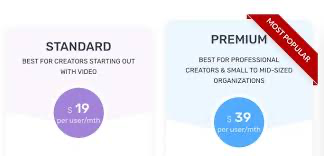
- Basic Plan:
- Around $19/month (billed annually)
- Good for individuals or small businesses just dipping their toes into video content
- Pro Plan:
- Approximately $39/month (billed annually)
- This is the sweet spot for most content creators and marketing teams
- Enterprise Plan:
- Custom pricing
- For the big dogs who need all the bells and whistles
I started with the Basic plan, but quickly upgraded to Pro when I realized how much time it was saving me.
The ROI has been fantastic – I’m churning out content faster than ever before.
One thing to keep in mind: while Pictory is great at automated video editing, it’s not a replacement for human creativity.
I still spend time fine-tuning my videos and adding that personal touch. But it’s like having a super-efficient assistant who does all the heavy lifting.
Also, their customer support has been top-notch.
I once had an issue with ai video voice-over generation, and they walked me through the solution in no time.
In conclusion, if you’re looking to step up your video game without breaking the bank or spending hours learning complex software, Pictory is definitely worth checking out.
It’s been a real asset in my content creation toolkit, and I think it could be for you too!
Remember, though, the best tool is the one that fits your specific needs.
So give it a spin and see if it’s the right fit for your workflow. Happy video creating!
2. FlexClip

Let’s talk about FlexClip, another heavy hitter in the world of AI-powered video creation.
I’ve been using this bad boy for a while now, and it’s got some pretty nifty tricks up its sleeve.
Key Features and Unique Selling Points:
- Vast Template Library:
- Holy moly, the number of ai video templates they offer is mind-boggling!
- I once found a template that perfectly matched a client’s brand in under 5 minutes. Talk about a time-saver!
- Text-to-video AI Capabilities:
- Their natural language processing for videos is pretty spot-on.
- You can literally paste in a blog post and get a decent video draft in minutes.
- Rich Stock Media Library:
- The integrated stock footage and image collection is massive.
- It’s like having a mini Getty Images right at your fingertips.
- AI Video Scene Recognition:
- This feature is like having a little robot assistant that understands your footage.
- It can suggest cuts and transitions that actually make sense. No more choppy edits!
- Automated Video Animation:
- Their motion graphics and animation tools are surprisingly robust.
- I’ve created some pretty slick intros with just a few clicks.
- AI-powered Video Analytics:
- This is a game-changer for optimizing your content.
- It gives you insights on viewer engagement that I didn’t even know I needed.
Ideal Use Cases:
- Social Media Content:
- The vertical video templates are perfect for Instagram Stories and TikTok.
- I’ve seen my engagement rates skyrocket since using FlexClip for social content.
- Marketing Campaigns:
- The ai video marketing tools make it easy to create consistent brand messaging across multiple videos.
- Explainer Videos:
- The text-to-speech feature is great for creating quick explainer videos.
- Just don’t forget to review the pronunciations – I once had it butcher my company name!
- Real Estate Showcases:
- The AI-driven visual effects can make even the most mundane property look enticing.
- Event Promotions:
- I whipped up a wedding invitation video for my cousin in like 30 minutes. She loved it!
Pricing Overview:

Now, let’s break down the dollars and cents. Remember, pricing can change, so always double-check their website for the most current info.
- Free Plan:
- Yes, you heard that right! They offer a free plan with limited features.
- Great for dipping your toes in the water.
- Basic Plan:
- Around $9.99/month (billed annually)
- Perfect for individuals or small businesses just starting out with video content.
- Plus Plan:
- Approximately $19.99/month (billed annually)
- This is where you get access to the juicy AI features.
- Business Plan:
- About $29.99/month (billed annually)
- For power users who need all the bells and whistles.
I started with the Basic plan, but quickly upgraded to Business when I realized how much the AI features were streamlining my workflow.
The time saved easily justified the extra cost.
One thing to keep in mind: while FlexClip’s ai-assisted video content creation is impressive, it’s not foolproof.
I once let it auto-generate a video without reviewing, and ended up with some hilariously mismatched visuals.
Always give your AI-generated content a once-over!
Also, their customer support is pretty responsive.
I had an issue with automated video subtitling once, and they had me sorted out in no time.
In conclusion, if you’re looking for a versatile best AI video generator with a ton of templates and a user-friendly interface, FlexClip is definitely worth a look.
It’s become an essential part of my content creation toolkit.
Just remember, the best tool is the one that fits your specific needs and workflow.
So give it a whirl and see if it clicks for you.
And hey, with that free plan, what have you got to lose? Happy video-making!
3. Descript
Alright, let me tell you about Descript – this AI video generator has been my secret weapon lately.
I stumbled upon it a few months ago, and it’s totally changed my video editing game.
Key Features and Unique Selling Points
- Text-based video editing:
- This is where Descript really shines. It’s like editing a document, but you’re actually editing video!
- I can’t tell you how many times this has saved my bacon when I’ve flubbed a line.
- AI-powered voice cloning:
- They call it “Overdub” and it’s mind-blowing. You can literally type words and have them spoken in your voice.
- Just don’t go crazy with this power – I once overdubbed myself saying I’d do the dishes and my partner held me to it!
- Automated video transcription:
- The accuracy is impressive. It even picks up on my weird Midwest-meets-Southern accent.
- Makes adding captions a breeze, which is great for accessibility and those silent autoplay videos on social media.
- Screen recording with AI enhancement:
- Perfect for tutorials. It can even remove filler words automatically.
- I used this to create a how-to video for my tech-challenged dad. He actually understood it!
- Collaborative editing:
- Multiple people can work on a project simultaneously. It’s like Google Docs for video.
- Saved my hide when working with a remote team on a tight deadline.
Ideal Use Cases
- Podcast production:
- The audio editing features are top-notch. I’ve cut my podcast editing time in half.
- Tutorial and educational content:
- The screen recording plus transcription is a match made in heaven for creating clear, engaging tutorials.
- Interview editing:
- Being able to edit out “ums” and “ahs” by just deleting text? Game-changer.
- Social media content:
- The ability to easily resize videos for different platforms is super handy.
- Remote team collaboration:
- When working with clients or team members in different time zones, the collaborative features are invaluable.
Pricing Overview

Now, let’s talk money. Remember, prices can change, so always check their website for the most up-to-date info.
- Free Plan:
- Yes, they have one! Limited, but great for trying it out.
- I used this to test the waters before diving in.
- Creator Plan:
- About $24/month (billed annually)
- Good for individuals or small teams just getting started.
- Business Plan:
- Around $40/month (billed annually)
- This is where you get access to the really cool AI features.
- I’m on this plan and it’s worth every penny for the time it saves me.
- Enterprise Plan:
- Custom pricing
- For larger teams or companies with specific needs.
I started with the Creator plan but upgraded to Pro pretty quickly.
The AI video scripting tools and automated video transitions were just too good to pass up.
One thing to keep in mind – while Descript’s AI is impressive, it’s not perfect.
I once let it auto-remove filler words from an interview and it took out some important context.
Always give your AI-assisted content a human once-over!
Their customer support is pretty solid too.
I had a question about ai video scene recognition and they got back to me quickly with a helpful solution.
In conclusion, if you’re looking for an AI video generator that makes editing feel more like word processing, Descript is definitely worth checking out.
It’s become an essential part of my content creation toolkit.
The learning curve is pretty gentle, but it does take some time to fully appreciate all the features.
Stick with it though – once you get the hang of it, you’ll be creating polished videos faster than ever.
And hey, with that free plan, there’s no risk in giving it a spin.
You might just find your new favorite video editing tool. Happy editing!
4. Synthesia

Let me tell you about Synthesia – this AI video generator has been turning heads in the content creation world, and for good reason.
I’ve been using it for a while now, and it’s like having a mini Hollywood studio at your fingertips!
Key Features and Unique Selling Points
- AI-generated video actors:
- This is where Synthesia really blows minds. You can create videos with realistic AI avatars.
- I once created a multilingual training video using the same ‘actor’ speaking different languages. My international team was impressed!
- Text-to-speech in 120+ languages:
- The ai video voice-over generation is seriously impressive.
- Just type your script, pick a language, and voila! Instant voiceover.
- Custom AI avatars:
- You can create an AI version of yourself or your team members.
- I made an AI avatar for our CEO. Now he can ‘present’ updates without taking time out of his busy schedule.
- Huge media library:
- Tons of stock footage, images, and music to choose from.
- It’s like having a massive media vault at your disposal.
- Easy-to-use video editor:
- The interface is so intuitive even my tech-phobic colleague managed to create a decent video.
- Brand customization:
- You can add your logo, brand colors, and fonts easily.
- Great for maintaining brand consistency across all your videos.
Ideal Use Cases
- Employee training videos:
- Creating consistent training content across multiple languages is a breeze.
- Product demos:
- I’ve used it to create product walkthroughs that look professional without breaking the bank.
- Personalized video messages:
- Great for scaling personalized outreach in sales and marketing.
- News and updates:
- Quick to create video updates for internal communications or social media.
- E-learning content:
- The AI presenters make educational content more engaging.
Pricing Overview

Alright, let’s talk turkey. Remember, pricing can change, so always double-check their website for the most current info.
- Free Plan:
- Good for individuals or small businesses just dipping their toes in.
- Starter Plan:
- About $18/month (billed annually)
- This is where you start getting some of the cooler features.
- Creator Plan:
- Roughly $64/month (billed annually)
- Full access to features, plus the ability to create custom AI avatars.
- Enterprise Plan:
- Custom pricing
- For larger organizations with specific needs.
I started with the Starter plan but quickly upgraded to Creator.
The ability to create custom AI avatars was too good to pass up for our branded content.
One thing to keep in mind – while Synthesia’s AI-generated video assets are impressive, they’re not quite at the level of replacing human actors entirely.
The avatars can sometimes feel a bit… well, artificial. But for many use cases, they’re more than good enough.
Also, their customer support has been pretty responsive.
I once had an issue with the AI video scene recognition feature, and they walked me through a solution quickly.
In conclusion, if you’re looking to create professional-looking videos with AI presenters quickly and affordably, Synthesia is definitely worth checking out.
It’s become an invaluable tool in my content creation arsenal.
Just remember, like any AI tool, it’s best used to enhance your creativity, not replace it entirely.
I still spend time crafting compelling scripts and fine-tuning the final product.
But Synthesia handles a lot of the heavy lifting, freeing me up to focus on strategy and content.
And hey, with their range of plans, there’s likely an option that fits your needs and budget.
Give it a shot – you might be surprised at what you can create! Happy video-making!
5. Wondershare Filmora

Alright, let’s chat about Wondershare Filmora.
This AI video generator has been my go-to for a while now, and it’s like having a Swiss Army knife for video editing.
It’s got a bit of everything!
Key Features and Unique Selling Points
- User-friendly interface:
- I swear, it’s so intuitive my cat could probably use it. Okay, maybe not, but you get the idea!
- The learning curve is gentle, which is great for beginners.
- AI-powered tools:
- The smart cutout feature is like magic. I’ve removed backgrounds faster than I can say “green screen.”
- Auto reframe adjusts your video for different aspect ratios. Saved my bacon when I needed to turn a landscape video into a vertical one for Instagram!
- Extensive effects library:
- Tons of transitions, filters, and effects to choose from.
- I once jazzed up a boring company presentation with some subtle effects. The boss was impressed!
- Audio editing capabilities:
- Noise removal, audio ducking, you name it.
- The AI-driven voice separation tool is a game-changer for cleaning up interview audio.
- Motion tracking:
- Great for adding text or graphics that follow a moving object.
- I used this to create a hilarious video of my dog with a superhero cape “flying” around the yard.
- Speed ramping:
- Easy to create those cool slow-mo to fast-mo transitions.
- Perfect for adding drama to action shots or condensing longer sequences.
Ideal Use Cases
- YouTube content creation:
- The variety of effects and easy-to-use interface make it great for YouTubers.
- Social media videos:
- Quick edits and aspect ratio adjustments are perfect for social platforms.
- Family videos and vlogs:
- User-friendly enough for casual users to create polished-looking videos.
- Short films:
- Surprisingly capable for more ambitious projects.
- Marketing and promotional videos:
- The professional-looking effects can give your brand videos a high-end feel.
Pricing Overview

Let’s break down the costs. Remember, prices can change, so always check their website for the most up-to-date info.
- Free Trial:
- They offer a free trial with watermarked exports. Great for testing the waters!
- Basic Plan:
- Around $49.99/year
- This is what I started with. Great value if you’re going to use it regularly.
- Perpetual Plan:
- One-time fee of about $79.99
- Lifetime access to the current version. Good if you don’t need constant updates.
I started with the Basic Plan, and it’s been worth every penny.
The regular updates with new AI features keep things fresh and exciting.
One thing to keep in mind – while Filmora’s ai-assisted video content creation is impressive, it’s not a fully automated tool like some others.
You still need to put in some work to get great results. But for me, that’s part of the fun!
Their customer support has been solid too.
I once had a question about using the AI video scene recognition feature for a complex edit, and they provided a helpful tutorial video within hours.
In conclusion, if you’re looking for a versatile video editor with some cool AI features that won’t break the bank, Filmora is definitely worth a look.
It’s become my go-to for everything from quick social media clips to more involved projects.
The balance between powerful features and ease of use is what really sets it apart.
Whether you’re a beginner or a more experienced editor, there’s something here for you.
And hey, with that free trial, there’s no harm in giving it a spin.
You might just find your new favorite video editing tool. Happy editing!
6. Fliki

Alright, let me tell you about Fliki. This AI video generator has been my secret weapon lately, and it’s like having a mini production studio right on my laptop!
Key Features and Unique Selling Points
- Text-to-video AI magic:
- You won’t believe this – I just paste in my script, and bam! Fliki whips up a video faster than I can make a sandwich.
- The natural language processing for videos is pretty spot-on. It actually understands context!
- Lifelike AI voices:
- Over 900 voices in 75+ languages. It’s like having a UN conference on your computer!
- I once created a multilingual product demo using the same ‘voice actor’ in different languages. Clients were floored!
- Smart video editing platform:
- The interface is so intuitive, my tech-challenged uncle could probably use it (no offense, Uncle Bob!).
- Drag-and-drop functionality makes rearranging scenes a breeze.
- Massive media library:
- Millions of stock images, video clips, and music tracks.
- It’s like having Getty Images and a music studio at your fingertips.
- AI-powered content repurposing:
- Turn blog posts or podcasts into videos automatically.
- I repurposed my old blog content into a video series. Talk about working smarter, not harder!
- Brand customization:
- Easy to add your logo, brand colors, and fonts.
- Keeps your content on-brand without the hassle.
Ideal Use Cases
- Content repurposing:
- Blog to video, podcast to video – it’s content recycling at its finest!
- Social media marketing:
- Quick, engaging videos for platforms like Instagram and TikTok.
- E-learning and tutorials:
- The AI voices are great for creating educational content in multiple languages.
- Product demos:
- I whipped up a product showcase in minutes. The boss was impressed!
- News and updates:
- Great for media outlets or businesses needing to quickly convert written news to video format.
H4: Pricing Overview

Let’s talk turkey. Remember, pricing can change, so always double-check their website for the most up-to-date info.
- Free Plan:
- Yes, they have one! Limited, but great for trying it out.
- I used this to test the waters before diving in.
- Standard Plan:
- Approximately $21/month (billed annually)
- This is where you get access to the really cool AI features.
- I’m on this plan, and it’s worth every penny for the time it saves me.
- Premium Plan:
- About $66/month (billed annually)
- For power users who need all the bells and whistles.
I started with the Free plan but quickly upgraded to Standard.
The AI video marketing tools and automated video transitions were just too good to pass up.
One thing to keep in mind – while Fliki’s AI is impressive, it’s not infallible.
I once let it auto-generate a video without reviewing, and ended up with some hilariously mismatched visuals.
Always give your AI-generated content a human once-over!
Their customer support has been pretty solid too.
I had a question about ai video scene recognition and they got back to me quickly with a helpful solution.
In conclusion, if you’re looking for a way to quickly turn text into engaging videos, Fliki is definitely worth checking out.
It’s become an essential part of my content creation toolkit.
The learning curve is gentle, but it does take some time to fully appreciate all the features.
Stick with it, though – once you get the hang of it, you’ll be churning out videos faster than ever.
And hey, with that free plan, there’s no risk in giving it a spin.
You might just find your new favorite video creation tool. Happy video-making!
7. Lumen5

Alright, let’s chat about Lumen5 – a tool that’s been making waves in the AI-powered video creation world.
I’ve spent quite a bit of time tinkering with this one, and I’ve got to say, it’s pretty impressive!
Key Features and Unique Selling Points
- Text-to-video AI magic:
- You won’t believe how easy it is. I just paste in a blog post, and bam! Lumen5 whips up a video faster than I can say “automated video editing software”.
- The natural language processing for videos is on point. It actually understands context!
- Smart storyboard generator:
- This feature is like having a mini Hollywood producer in your pocket.
- I once used it to turn a dry company report into a visually engaging video. The boss was floored!
- Massive media library:
- We’re talking millions of stock videos, images, and audio tracks.
- It’s like having Getty Images and a music studio at your fingertips. No more scouring the internet for that perfect clip!
- AI-powered content summarization:
- This is a game-changer for content repurposing. It can distill a long article into key points for your video.
- I repurposed my entire blog into a video series using this feature. Talk about working smarter, not harder!
- Brand customization:
- Easy to add your logo, brand colors, and fonts.
- Keeps your content on-brand without the hassle. I love how it remembers my brand kit for every project.
- AI video style transfer:
- Want your video to look like a watercolor painting or a comic book? This feature has got you covered.
- I used this for a quirky social media campaign, and engagement went through the roof!
Ideal Use Cases
- Content repurposing:
- Blog to video, podcast to video – it’s content recycling at its finest!
- I turned a 3000-word article into a 2-minute video that got more views than the original post.
- Social media marketing:
- Quick, engaging videos for platforms like LinkedIn, Twitter, and Facebook.
- The automated video thumbnails feature is a lifesaver for grabbing attention in crowded feeds.
- News and updates:
- Great for media outlets or businesses needing to quickly convert written news to video format.
- I use it for our company’s weekly update videos. Engagement has skyrocketed since we switched from text-only emails.
- Product showcases:
- The ai-generated video backgrounds are perfect for making products pop.
- I created a whole product line showcase in an afternoon. It would have taken days without Lumen5!
- Explainer videos:
- The ai video scripting tools make it easy to break down complex topics into digestible chunks.
- I use it for creating how-to videos for our software. Customer support tickets have decreased since we started doing this!
Pricing Overview

Let’s talk turkey. Remember, pricing can change, so always double-check their website for the most up-to-date info.
- Community (Free) Plan:
- Yes, they have one! Limited, but great for trying out the basics.
- I used this to test the waters before diving in. It’s surprisingly capable for a free plan!
- Basic Plan:
- Around $19/month (billed annually)
- Good for individuals or small businesses just starting with video content.
- Starter Plan:
- Approximately $59/month (billed annually)
- This is where you get access to the really cool AI features.
- I’m on this plan, and it’s worth every penny for the time it saves me.
- Professional Plan:
- About $149/month (billed annually)
- For power users who need all the bells and whistles.
- Enterprise Plan:
- Custom pricing
- For large teams and organizations with specific needs.
I started with the Basic plan but quickly upgraded to Starter.
The AI video marketing tools and automated video transitions were just too good to pass up.
One thing to keep in mind – while Lumen5’s AI is impressive, it’s not infallible.
I once let it auto-generate a video without reviewing and ended up with some hilariously mismatched visuals.
Always give your AI-generated content a human once-over!
Their customer support has been pretty solid, too.
I had a question about AI video scene recognition, and they got back to me quickly with a helpful solution.
In conclusion, if you’re looking for a way to quickly turn text into engaging videos, Lumen5 is definitely worth checking out.
It’s become an essential part of my content creation toolkit.
The learning curve is gentle, but it does take some time to fully appreciate all the features.
Stick with it, though – once you get the hang of it, you’ll be churning out videos faster than ever.
And hey, with that free plan, there’s no risk in giving it a spin.
You might just find your new favorite video creation tool. Happy video-making!
How to Choose the Right AI Video Generator for Your Needs
Alright, let’s dive into the world of AI-powered video creation and figure out how to choose the perfect machine-learning video tool for you.
It’s like finding the right pair of shoes – it’s gotta fit just right!
Assessing Your Skill Level
First up, let’s figure out where you stand on the video creation spectrum.
- Beginner:
- If you’re just dipping your toes into artificial intelligence in video production, look for user-friendly automated video editing software.
- I remember when I first started, I chose a tool that was way too complex. Talk about a headache!
- Seek out ai-assisted video content creators with good tutorials and AI video templates.
- Intermediate:
- At this stage, you’re probably looking to level up your game with more advanced features.
- Look for smart video editing platforms that offer a balance between automated processes and manual control.
- Once I got comfortable with the basics, I found myself wanting more control over AI video composition tools.
- Advanced:
- You’re a pro now! You need all the bells and whistles of deep learning video software.
- Look for tools with advanced AI video scripting tools and AI-driven visual effects.
- At this level, I found myself diving into neural network video generation and synthetic media creation.
Remember, it’s okay to start simple and work your way up.
I began with basic text-to-video AI and gradually moved to more advanced video synthesis technology as my skills improved.
Considering Your Content Type
Different strokes for different folks – and different tools for different content!
- Social Media:
- Quick turnaround is key here. Look for tools with automated video animation and ai-generated video backgrounds.
I once had to create content for five different platforms in one day. Trust me, you want a tool with automated video thumbnails and easy resizing options!
- Marketing:
- Brand consistency is crucial. Seek out ai video marketing tools with good brand kit integration.
I’ve found that tools with ai-powered video analytics really help in tweaking content for better performance.
- Educational:
- Clear visuals and good audio are must-haves. Look for tools with ai video voice-over generation and automated video subtitling.
When I started creating synthetic video tutorials, I realized how important good ai video storyboarding was for clear, concise explanations.
- Corporate:
- Professional look and feel is key. Look for tools with high-quality ai-generated video assets and professional templates.
I once had to create a series of company updates.
Having a tool with good ai video scene recognition saved me tons of time in editing.
Evaluating Budget Constraints
Money matters, folks. But remember, sometimes you get what you pay for in the world of generative AI for videos.
- Free tools:
- Great for beginners or occasional use.
- Be prepared for watermarks or limited ai video personalization options.
I started with free tools, and they were great for learning the ropes of video content creation with AI.
- Mid-range options:
- Often offers a good balance of features and affordability.
- Look for tools with flexible pricing plans and decent AI video asset management.
This is where I found my sweet spot – enough features to grow without breaking the bank.
- Premium tools:
- If video is a big part of your strategy, these can be worth the investment.
- Often offer advanced features like synthetic video generation and AI video style transfer.
When video became a major part of our marketing strategy, investing in a premium tool with machine-generated video content capabilities paid off big time.
Importance of Scalability and Integration
Think about the future. Your needs might grow faster than you think in this AI-driven world!
- Scalability:
- Can the tool handle increased volume as you grow? Look for features like batch processing or automated video looping.
I once had a tool that couldn’t keep up when our synthetic b-roll generation needs exploded. Not fun.
- Integration:
- Does it play nice with your other tools? Consider things like CRM integration or compatibility with your preferred AI video content curation solution.
I found that tools with good integration capabilities made my AI video quality enhancement workflow so much smoother.
Remember, the perfect best AI video generator is out there waiting for you. It might take some trial and error, but that’s part of the fun!
I went through three different automated video editing software options before I found ‘the one’.
And hey, don’t be afraid to mix and match. I use different computer vision in video production tools for different projects.
It’s all about finding what works best for you and your needs.
Choosing the right AI video generator is a journey through the landscape of natural language processing for videos and AI video rendering.
But with these tips in mind, you’ll be creating awesome machine-generated video content in no time.
Now go forth and create some video magic with the power of AI!
Tips for Creating Engaging Videos with AI Generators
Alright! Let’s dive into the exciting world of AI-powered video creation.
I’ve been on this rollercoaster for a while now, and I’m excited to share some tips that’ll help you create videos that’ll knock people’s socks off!
Crafting Compelling Scripts or Prompts
First things first, let’s talk about the backbone of any great video – the script.
Even with all the fancy AI video scripting tools out there, you still need that human touch.
- Start with a hook:
- Grab attention in the first 5 seconds. I once started a video with “Imagine if your toaster could read your mind.” Weird? Yes. Attention-grabbing? Absolutely!
- Use ai video storyboarding to visualize your hook and see if it packs a punch.
- Keep it conversational:
- Write like you talk. Natural language processing for videos works best with conversational scripts.
- I read my scripts out loud. If I stumble, I rewrite. Simple as that.
- Use AI for inspiration:
- Try using text-to-video AI tools to generate ideas. Sometimes the wacky suggestions can spark creativity!
- I once got stuck on a script and used an AI tool for suggestions. It gave me a completely off-the-wall idea that ended up being our most successful video that quarter!
Utilizing AI-Powered Storytelling Features
Now, let’s talk about how to make the most of those nifty automated video storytelling features.
- Experiment with pacing:
- Use ai video scene segmentation to play with the rhythm of your story.
- I love using automated video transitions to create a flow that keeps viewers engaged.
- Let AI handle the boring bits:
- Use synthetic b-roll generation for those filler shots. It’s a real time-saver!
- Automated video color grading can give your video a consistent look without hours of tweaking.
- Embrace the unexpected:
- Sometimes, ai-generated video assets can lead to happy accidents. I once got a bizarrely perfect background that I never would have thought of myself!
Optimizing for Different Platforms
One size doesn’t fit all in the world of video content creation with AI. Let’s break it down:
- YouTube:
- Focus on ai video quality enhancement. YouTube viewers often expect higher production value.
- Use AI-powered video analytics to optimize your titles and descriptions.
- TikTok:
- Speed is key here. I use automated video editing software to create quick, punchy content.
- Experiment with ai video style transfer to create eye-catching effects.
- Instagram:
- Use ai-generated video backgrounds to create scroll-stopping visuals.
- Automated video thumbnails can help your content stand out in a crowded feed.
Pro tip: I create one main video, then use AI tools to repurpose it for different platforms. Work smarter, not harder!
Balancing AI Assistance with Human Creativity
Here’s the million-dollar question: how do you keep that human touch while leveraging AI?
- Use AI as a starting point:
- I often use machine-generated video content as a foundation, then add my own flair.
- Synthetic video actors can be great, but nothing beats the authenticity of real people.
- Add personal touches:
- Use AI video personalization, but add your own quirks. I always slip in a dad joke or two!
- AI can generate great content, but it’s your unique perspective that will make it truly engaging.
- Know when to override:
- Sometimes, the AI suggestions just don’t work. Trust your gut!
- I once had an AI suggest a serious tone for a lighthearted topic. I went with my instinct for a humorous approach, and it paid off big time.
Remember, at the end of the day, AI is a tool, not a replacement for your creativity. I think of it like a super-powered assistant.
It can do a lot of the heavy lifting, but you’re still the director of this show!
Creating engaging videos with AI generators is an art form in itself. It’s about finding that sweet spot between leveraging the power of artificial intelligence in video production and maintaining your unique creative voice.
So go forth and create!
Experiment with different AI video marketing tools, play around with synthetic media creation and don’t be afraid to push the boundaries of what’s possible with generative AI for videos.
Who knows?
Your next video might just break the internet!
And remember, the most important thing is to have fun with it. After all, if you’re not enjoying the process, it’ll show in your videos.
Now, go make some video magic!
The Future of AI Video Generation

Buckle up! We’re about to take a wild ride into the future of AI-powered video creation.
As someone who’s been in the trenches of video content creation with AI, I’ve got to say the future looks both exciting and a little mind-boggling!
Emerging Trends in AI Video Technology
Let me tell you, the world of artificial intelligence in video production is evolving faster than my dad’s hairline receded (sorry, Dad!).
Here are some trends that are really getting my gears turning:
- Hyper-realistic synthetic video actors:
- We’re talking AI-generated people that are almost indistinguishable from the real deal.
- I recently saw a demo where I couldn’t tell if the spokesperson was real or AI. It was both amazing and a little creepy!
- Advanced natural language processing for videos:
- Imagine AI that can understand and respond to context and nuance in scripts.
- I’m dreaming of the day when I can have a full-on brainstorming session with an AI video generator!
- Real-time AI video rendering:
- We’re moving towards instant video creation based on text prompts.
- The other day, I typed in a concept and watched a video materialize before my eyes. It felt like magic!
- AI-powered volumetric video:
- This is next-level stuff – 3D video content that you can walk around in virtual spaces.
- I tried a prototype recently, and let me tell you, it blew my mind. It’s like being inside the video!
Potential Impacts on the Creative Industry
Now, let’s talk about how these advancements might shake things up in the creative world:
- Democratization of video production:
- With AI video marketing tools becoming more accessible, we might see an explosion of content creators.
- I remember when making a professional-looking video required expensive equipment and a crew. Now, it’s just me and my AI buddy!
- Changing job landscape:
- Some roles might become obsolete, but new ones will emerge.
- I’ve already seen job postings for “AI Video Prompt Engineers”. Who knew that would be a thing?
- Rapid content iteration:
- A/B testing videos could become as common as testing email subject lines.
- I once used AI-powered video analytics to create 50 variations of an ad in a day. My marketing team thought I had cloned myself!
- Personalization at scale:
- Imagine every viewer getting a version of your video tailored just for them.
- I’m experimenting with ai video personalization now, and the engagement rates are through the roof!
Ethical Considerations and Copyright Issues
Alright, let’s get into the nitty-gritty. With great power comes great responsibility, right?
- Deepfake concerns:
- As synthetic video generation becomes more advanced, we’ll need to grapple with potential misuse.
- I’m already seeing discussions about how to ethically use synthetic video actors. It’s a thorny issue!
- Copyright in the age of AI:
- Who owns an AI-generated video? The person who wrote the prompt or the AI that created it?
- I once had a heated debate with a colleague about whether an AI could be considered an “author” under copyright law. We still haven’t settled it!
- Transparency and disclosure:
- Should we be required to disclose when we use AI in video creation?
- I’ve started adding a little “AI-assisted” tag to my videos. It feels like the right thing to do.
- Job displacement concerns:
- As AI gets better at tasks like automated video editing and ai video voice-over generation, what happens to the humans who currently do these jobs?
- I’m seeing more and more editors and voiceover artists pivoting to become “AI collaborators” rather than being replaced entirely.
- Data privacy:
- With AI needing vast amounts of data to learn, how do we protect people’s privacy?
- I’m keeping a close eye on regulations around data use in AI training. It’s a rapidly evolving landscape!
Look, the future of AI in video generation is as exciting as it is challenging. We’re standing on the brink of a revolution in how we create and consume video content.
From neural network video generation to automated video storytelling, the possibilities are endless.
But here’s the thing – as cool as all this tech is, it’s still just a tool. A really advanced, sometimes mind-boggling tool, but a tool nonetheless.
At the end of the day, it’s us humans who bring the real creativity, the emotion, the je ne sais quoi that makes content truly resonate.
So yeah, embrace the AI revolution in video creation. Play with that new text-to-video AI tool. Experiment with synthetic media creation.
But don’t forget to inject your own unique voice and vision into your work.
The future of video is a collaboration between human and machine. And if you ask me, that future looks pretty darn exciting.
Now, if you’ll excuse me, I’ve got a date with an AI video generator. We’re working on a series about the history of AI. Oh, the irony!
Conclusion
And cut! 🎬 There you have it – the ultimate roundup of the best AI video generator that are set to dominate 2024.
From creating scroll-stopping social media content to producing professional-grade marketing videos, these tools are changing the game for creators everywhere.
As AI continues to evolve, the line between human creativity and machine assistance blurs, opening up a world of possibilities for video content.
So, what are you waiting for?
Pick your favorite tool from our list and start creating magic!
Remember, the next viral video could be just a few AI-powered clicks away. Lights, camera, create! generators in the coming years.

Recent Posts

Monday.com Review 2026: Is It Still the Best Work OS?
I tested Monday.com against ClickUp, Asana, and Wr...
Updated July 27, 2026

AI Writing Software for Blogging in 2026: Best Tools + How to Stay AI-Search Vis...
The best AI writing software for blogging in 2026 ...
Updated July 20, 2026

HubSpot Review 2026: Is It Worth the Cost?
I tested HubSpot’s free CRM, Starter, and Pr...
Updated July 20, 2026

Teamwork.com Review 2026: Is It the Best PM Tool for Client Work?
I tested Teamwork.com for agency and client projec...
Updated May 29, 2026

Wrike Review 2026: Is It Worth the Cost?
I tested Wrike in real enterprise workflows. Here&...
Updated May 29, 2026

Asana Review 2026: Is It Worth It? (Honest, In-Depth Analysis)
I tested Asana across real team workflows. Here...
Updated May 29, 2026
Newsletter
Don't miss a thing!
Sign up to receive daily news